Overview
Validatar stores all of its operational data — metadata catalogs, test definitions, execution results, profiling metrics, trust scores, and more — in its internal repository database (SQL Server or PostgreSQL). While this database powers the application, it isn't designed for ad-hoc analytics or cross-platform reporting.
Repository replication solves this by continuously syncing Validatar's internal data to a Snowflake or Databricks data processing engine. Once configured, Validatar incrementally loads repository tables into a dedicated schema on that engine, giving your team direct SQL access to all of Validatar's operational data. This enables custom reporting, integration with BI tools, cross-environment comparisons, and any analysis that benefits from having Validatar's data in a queryable warehouse.
Prerequisites
Before configuring repository replication, you need:
- A Snowflake or Databricks data processing engine already created in Validatar (see Creating a Snowflake Data Processing Engine or Creating a Databricks Data Processing Engine)
- The Snowflake or Databricks Results Storage license feature enabled for your Validatar environment
- Administrator access — only users with the Global Configuration Admin role can configure replication
Configuring Repository Replication
Navigate to Settings > Configuration > Repository Replication.
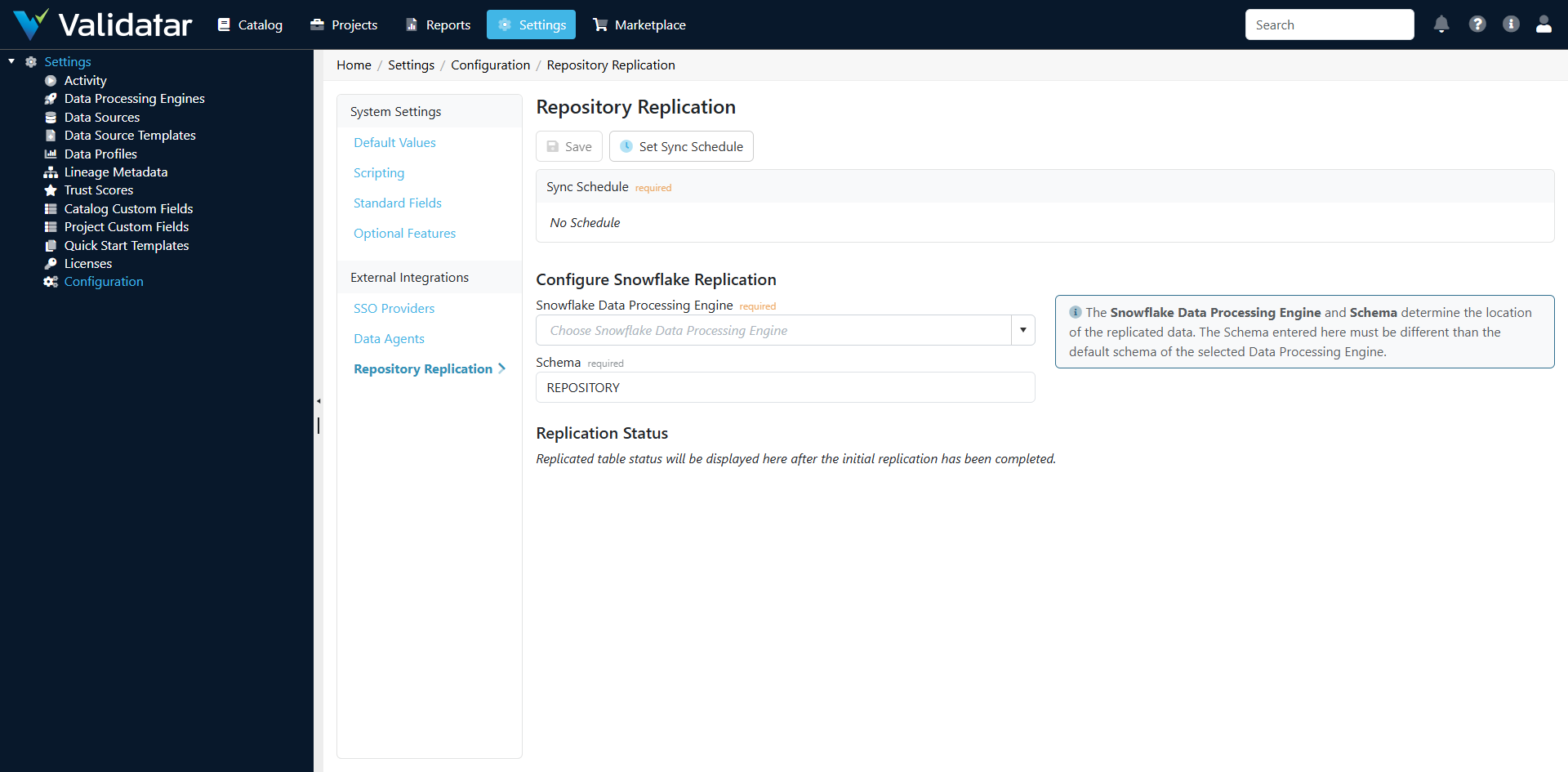
Step 1: Select a Data Processing Engine
Choose the Snowflake or Databricks data processing engine that will receive the replicated data. The dropdown lists all verified engines configured in your environment.
Step 2: Specify a Schema
Enter the schema name where replicated tables will be created. The default is REPOSITORY.
Note: The replication schema must be different from the default schema of the selected data processing engine. Validatar creates and manages this schema automatically — you don't need to create it ahead of time. On Databricks, the schema is created inside the engine's results catalog.
Step 3: Set a Sync Schedule
Click Set Sync Schedule to configure how often replication runs.
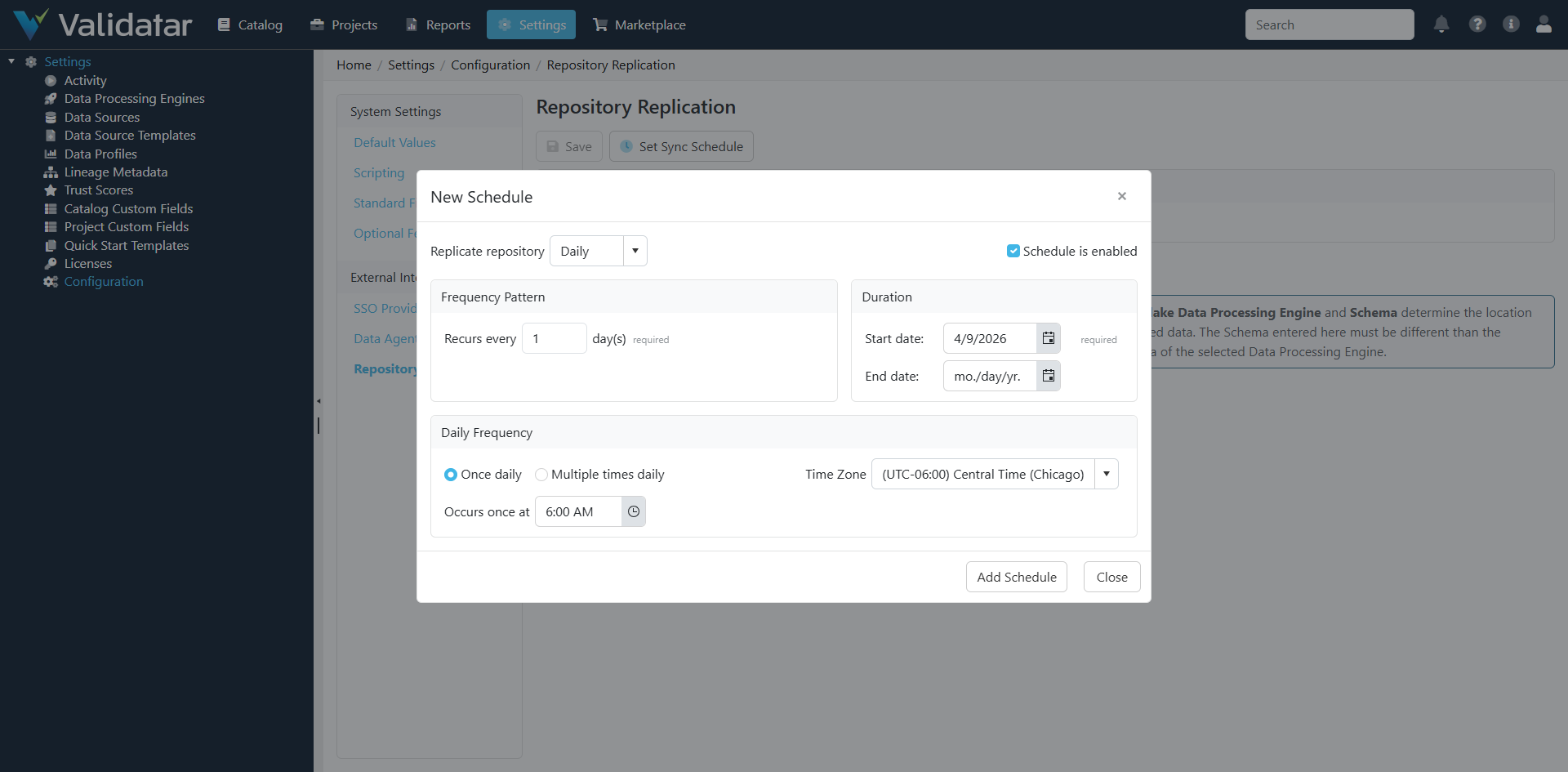
You can schedule replication to run:
- Daily — once per day or multiple times per day
- Weekly — on specific days of the week
- Monthly — on specific days of the month
For most organizations, a daily sync is sufficient. If your team needs near-real-time access to test results or execution history, consider scheduling multiple runs per day.
Step 4: Save
Click Save to persist the configuration. Replication will begin according to the schedule you set.
How Incremental Loading Works
Repository replication uses an incremental loading strategy to minimize the data transferred on each run.
The Watermark Approach
Each replicated table tracks a watermark — the timestamp of the last successful sync, stored as DateLastSynced per table. On each replication run:
- Validatar queries its internal database for rows where the sync column is greater than the watermark
- Only new and modified rows since the last sync are selected
- These rows are serialized, streamed to a staging table on the engine, and merged into the target tables
- The watermark advances to the latest timestamp seen
The sync column is DateModified when available, falling back to DateCreated for tables that don't track modification timestamps.
The Staging and Merge Process
Replication uses a staging-then-merge pattern:
- Staging — Changed rows are serialized as JSON and uploaded to a transient staging table (
RepositoryReplicationStaging) on the engine - Merge — For each table, Validatar executes a
MERGE INTOstatement that:- Updates existing rows (matched on the primary key
ID) - Inserts new rows that don't exist in the target
- Updates existing rows (matched on the primary key
- Cleanup — Staging records are deleted after a successful merge
This approach is efficient (only changed data is transferred), idempotent (re-running the same batch produces the same result), and handles both inserts and updates in a single operation.
Full Re-Sync
If you need to force a complete reload of specific tables — for example, after a schema change or data correction — you can reset the sync dates for individual tables. This clears the watermark and causes the next replication run to pull all rows for those tables.
What Gets Replicated
Validatar replicates 55 tables from its internal repository, covering every major area of the platform. Replicated table names use SNAKE_CASE naming convention.
Metadata Catalog
| Replicated Table | What It Contains |
|---|---|
META_SCHEMA |
Schemas discovered from data sources |
META_TABLE |
Tables and views in each schema |
META_TABLE_VERSION |
Historical versions of table metadata |
META_COLUMN |
Columns within tables |
META_COLUMN_VERSION |
Historical versions of column metadata |
META_DATA_SOURCE |
Data source configurations |
META_DATA_PERMISSION |
Permissions on metadata objects |
META_LINEAGE_SOURCE |
Lineage source mappings |
META_LINEAGE_TARGET |
Lineage target mappings |
Profiling and Trust Scores
| Replicated Table | What It Contains |
|---|---|
META_DATA_LATEST_PROFILE |
Most recent profile results per object |
META_DATA_PROFILE_SET |
Profile set configurations |
DATA_PROFILE_DEF |
Profile definition metadata |
META_TABLE_TRUST_SCORE |
Trust scores per table |
TRUST_SCORE_IMPACT_RATING |
Trust score impact rating configurations |
Tests and Executions
| Replicated Table | What It Contains |
|---|---|
TEST |
Test definitions |
TEST_VERSION |
Historical versions of test configurations |
TEST_DATA_SET |
Data sets associated with tests |
TEST_DATA_SET_TYPE |
Data set type classifications |
TEST_EXECUTION |
Individual test execution results |
TEST_META_LINK |
Links between tests and metadata objects |
TEST_OVERALL_RESULT_STATUS |
Aggregated test result statuses |
Template Tests
| Replicated Table | What It Contains |
|---|---|
TEMPLATE_TEST_VERSION |
Template test version configurations |
TEMPLATE_TEST_DATA_SET |
Template test data set definitions |
TEMPLATE_TEST_CHILD_OBJECT |
Materialized child test object mappings |
TEMPLATE_TEST_EXECUTION |
Template test execution results |
Jobs and Scheduling
| Replicated Table | What It Contains |
|---|---|
BATCH |
Execution batch records |
JOB |
Job definitions |
JOB_STEP |
Steps within jobs |
JOB_STEP_EXECUTION |
Individual job step execution results |
JOB_SCHEDULE |
Job schedule associations |
SCHEDULE |
Schedule definitions |
SCRIPT_EXECUTION |
Script execution records |
Projects and Permissions
| Replicated Table | What It Contains |
|---|---|
PROJECT |
Project definitions |
PROJECT_DATA_SOURCE |
Data source assignments to projects |
PROJECT_MEMBER |
User membership in projects |
PROJECT_MEMBER_ROLE |
Role assignments for project members |
Connections
| Replicated Table | What It Contains |
|---|---|
CONNECTION |
Connection definitions |
CONNECTION_VERSION |
Connection version configurations |
Custom Fields
| Replicated Table | What It Contains |
|---|---|
CUSTOM_FIELD |
Custom field definitions |
CUSTOM_FIELD_SECTION |
Custom field section groupings |
CUSTOM_FIELD_SECTION_FIELD |
Fields within sections |
CUSTOM_FIELD_OBJECT_VALUE |
Custom field values assigned to objects |
CUSTOM_FIELD_OPTION |
Dropdown options for custom fields |
Users and Roles
| Replicated Table | What It Contains |
|---|---|
USER |
User accounts |
USER_IDENTITY |
User identity records (SSO, local) |
USER_ROLE |
Role assignments |
USER_GROUP |
User group definitions |
USER_GROUP_USER |
Group membership |
ROLE |
Role definitions |
Configuration and System
| Replicated Table | What It Contains |
|---|---|
CODE_DEF |
Code definition lookup values |
COMMENT |
Comments on objects |
EVENT |
System events |
EVENT_TYPE |
Event type classifications |
EXCEPTION_LOG |
Exception and error logs |
FOLDER |
Folder hierarchy for organizing objects |
QUALITY_DIMENSION |
Quality dimension definitions |
REPORT |
Report configurations |
REPORT_PERMISSION |
Report access permissions |
SEVERITY_LEVEL |
Severity level definitions |
Helper Views
After each replication run, Validatar automatically creates and refreshes helper views in the replication schema that simplify common reporting queries:
| View | Purpose |
|---|---|
VW_DATASET_HELPER_TABLE_PROFILES |
Joins latest profile results with profile definitions for table-level profiles — one row per table per profile metric |
VW_DATASET_HELPER_COLUMN_PROFILES |
Same structure for column-level profiles — one row per column per profile metric |
VW_DATASET_TABLES |
A wide view of tables with pivoted custom field values and profile metrics joined in, ready for BI consumption |
VW_DATASET_COLUMNS |
Same structure for columns — includes custom field pivots and column-level profile metrics |
The VW_DATASET_TABLES and VW_DATASET_COLUMNS views are dynamically generated based on your custom field and profile definitions. When custom fields or profile definitions change, these views are automatically rebuilt on the next replication run.
Schema Evolution
Validatar handles schema changes automatically. On every replication run, the system compares the expected column structure of each replicated table against the actual table on the engine. If a mismatch is detected — a new column was added to the Validatar model, a column type changed, or a column was removed — the table is dropped and recreated with the correct schema. The sync date for that table is reset, triggering a full reload on the next pass.
This means you don't need to manually manage the replication schema as Validatar evolves. Upgrades that add new columns to internal tables are handled transparently.
Replication Status
After the initial replication completes, the Replication Status section on the configuration page displays per-table statistics:
- Table Name — the replicated table
- Row Count — total rows in the replicated table
- Unchanged — rows that haven't changed since the last sync
- Modified — rows updated since the last sync
- Inserted — new rows since the last sync
You can also view a comparison between your Validatar repository and the engine to identify any unexpected mismatches. If a table shows a discrepancy, you can clear its sync date to force a full re-sync.
Best Practices
- Schedule replication during off-peak hours — The initial full sync can be resource-intensive. Schedule it for a time when both your Validatar instance and your data platform have available capacity.
- Use a dedicated schema — Keep replicated data separate from your other objects. The default
REPOSITORYschema is a good choice. - Monitor the Replication Status page — Check periodically for unexpected mismatches between Validatar and engine row counts. Small differences immediately after a sync are normal (new data may have arrived between the sync and the comparison), but persistent large mismatches indicate an issue.
- Grant read-only access on the engine — Give reporting and BI users SELECT-only access to the replication schema. Don't modify the replicated tables directly — Validatar manages them.
- Use the helper views for reporting — The
VW_DATASET_TABLESandVW_DATASET_COLUMNSviews are designed for BI tools and dashboards. They pre-join the most commonly needed dimensions, saving you from writing complex queries against the raw tables.
How This Fits Into the Bigger Picture
Repository replication connects Validatar's internal data to your broader analytics ecosystem. With your metadata, test results, profiling metrics, and trust scores in your warehouse, you can:
- Build custom dashboards in tools like Tableau, Power BI, or Looker
- Run cross-environment comparisons by replicating multiple Validatar instances to the same warehouse
- Create automated alerts based on test result trends or trust score changes
- Feed Validatar data into data governance platforms for unified metadata management
- Perform historical analysis of testing coverage, execution trends, and data quality improvements over time
The view and table structures are identical on Snowflake and Databricks; for the minor SQL syntax differences between the two, see the Data Processing Engine Schema Overview.
For more on data processing engines, see What Is a Data Processing Engine? and Creating Data Processing Engines.