Overview
Validatar connects to data wherever it lives — cloud warehouses, on-premises databases, file systems, APIs, and everything in between. Each of these platforms speaks its own dialect: different SQL syntax, different system catalogs, different data types, different profiling capabilities. A data source template is how Validatar captures all of those platform-specific details in one reusable package, so that every data source you create on that platform starts with a consistent, proven configuration.
Think of a data source template as a blueprint. It defines how Validatar should discover metadata, profile data, quote identifiers, map data types, and expose reusable macros for a given platform. When you create a data source and assign it a connection that uses a specific template, all of those behaviors come along automatically. You don't have to write ingestion scripts from scratch for every new Snowflake database or every new PostgreSQL instance — the template handles it.
Why Templates Matter
Without templates, every data source would require manual configuration: writing metadata ingestion SQL, defining which data profiles are available, mapping data types to Validatar's internal type system, and configuring identifier delimiters. That's tedious for a single database and unsustainable at enterprise scale, where organizations commonly manage dozens or hundreds of data sources.
Templates solve this by centralizing platform knowledge:
- Consistency — Every data source on the same platform behaves the same way. Metadata ingestion returns the same structure, profiling produces the same metrics, and data types map correctly across all instances.
- Reusability — Define the configuration once and apply it to as many data sources as needed. When you improve an ingestion script or add a new macro, every data source using that template benefits.
- Extensibility — Start with a built-in template and customize it, or create entirely new templates for platforms that don't have one yet. The Python scripting framework means any data source you can reach programmatically can have a template.
- Shareability — Export templates as files and import them into other Validatar environments. Publish them to the Validatar Marketplace for the broader community to use.
What a Template Contains
A data source template is made up of several components, each accessible from its own tab in the template editor:
| Component | What It Defines |
|---|---|
| General | Template name, version, connection category, connection type restrictions, and identifier delimiters |
| Data Types | Mappings from engine-specific types (e.g., VARCHAR, NUMBER(38,0)) to Validatar's internal metadata types |
| Defaults | Configurable parameters and pre/post-execution scripts (primarily used by Python-based templates) |
| Metadata Ingestion | Scripts that discover schemas, tables, and columns from the data source |
| Profiling | Definitions or scripts that calculate data profile metrics (row counts, null percentages, distributions, etc.) |
| Macros | Reusable, parameterized SQL or script snippets available in test creation and test actions |
Each of these components is covered in detail in its own article within this section.
SQL Templates vs. Python Templates
Templates fall into two broad categories based on how they connect to and query data:
SQL-Based Templates (Database Category)
SQL templates are designed for platforms that expose a standard SQL interface and system catalogs. This includes most relational databases and cloud warehouses:
- SQL Server, PostgreSQL, MySQL
- Snowflake, Databricks, Amazon Redshift, Google BigQuery, Azure Synapse
For these templates, metadata ingestion scripts are SQL queries against system views like INFORMATION_SCHEMA. Profiling is defined through SQL expressions. The template specifies identifier delimiters so that object names are quoted correctly for the platform's SQL dialect.
Python-Based Templates (Script Category)
Python templates use Validatar's open Python framework to connect to sources that don't expose a traditional SQL interface:
- REST APIs (described by Swagger/OpenAPI specifications)
- File systems (local directories, S3, Azure Blob Storage, SFTP)
- Custom or proprietary data platforms
- Any source reachable via a Python library
For these templates, ingestion is a single Python script that returns pandas DataFrames. Profiling uses Python profile scripts rather than SQL definitions. Template parameters (API keys, connection strings, file paths) are configured on the Defaults tab and passed into scripts at runtime.
Choosing Between Them
The decision is usually straightforward: if you can query the data source with SQL and it has system catalogs that describe its schema, use a SQL template. If you need programmatic access through a library or API, use a Python template.
Built-In Templates
Validatar ships with templates for the most common platforms, including Snowflake, SQL Server, and PostgreSQL. These templates come pre-configured with:
- Complete metadata ingestion scripts for all levels (schema, table, column)
- Standard data type mappings
- A standard set of data profile definitions
- Default macros for common testing patterns
You can use these templates as-is, customize them for your specific needs, or use them as reference when building templates for other platforms.
How Templates Connect to Data Sources
Understanding the relationship between templates, connections, and data sources is key:
- A data source template defines platform-specific behavior (ingestion, profiling, types, macros)
- A connection type represents a specific connector (e.g., "Snowflake", "SQL Server via ODBC"). Each connection type can be associated with one or more templates.
- A connection version is the actual configuration for reaching a specific database — server name, credentials, and which template to use
- A data source is the Validatar object that represents a specific database or data platform. It references a connection, which in turn references a template.
When you create a data source and configure its connection, selecting a connection type narrows the available templates. Selecting a template then loads all of its defaults — ingestion scripts, profiling definitions, macros, and data types — into the data source's configuration. You can override any of those defaults at the individual data source level without modifying the template itself.
Note: In some areas of the application and API, you may see the term "Database Engine" instead of "Data Source Template." This is a legacy naming convention from earlier versions of Validatar. The two terms refer to the same concept.
Where to Find Templates
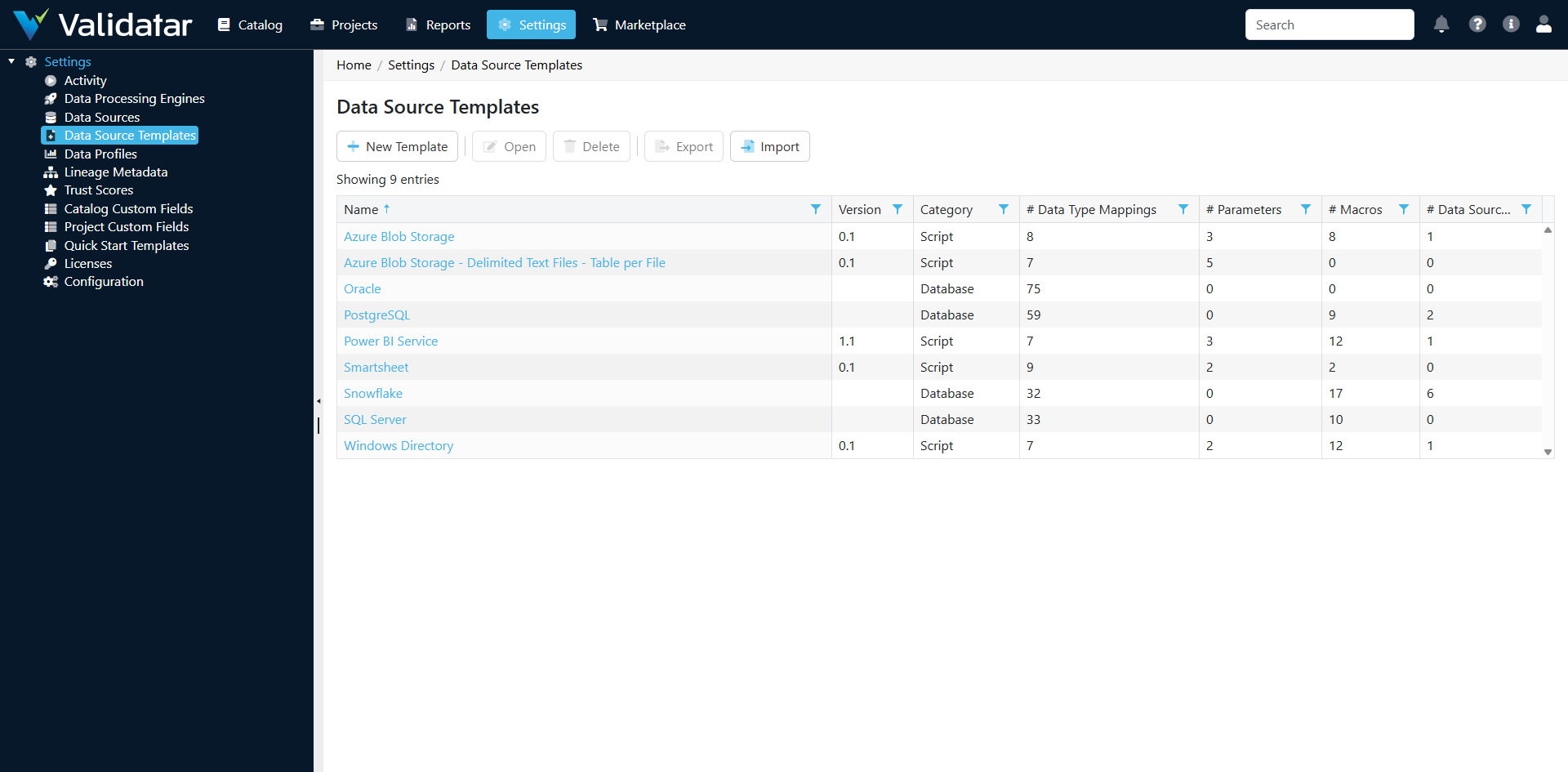
Navigate to Settings > Data Source Templates to view, create, import, and manage templates. You need administrator-level access to modify templates, since changes affect every data source that uses them.
How This Fits Into the Bigger Picture
Data source templates are the foundation of Validatar's "connect to anything" architecture. They sit at the intersection of data connectivity, metadata management, and test generation:
- Templates feed metadata ingestion, which populates the data catalog
- The catalog drives test recommendations and template test materialization
- Templates provide profiling definitions that power data quality metrics and trust scores
- Template macros give users reusable building blocks for test creation
For a complete walkthrough of how all these components work together, see Data Source Templates: The Complete Picture.