Overview
The Alation - Catalog Custom Fields set adds an Alation section to the Validatar catalog at data source, schema, table and column level. These fields hold what Alation knows about each object: its Alation key and link, title, description, tags, domains, stewards and trust flag.
The Alation metadata script fills the fields from Alation. The Alation Data Source Template reads two of them when it publishes Validatar results to Alation Data Health. Both are part of the Alation Integration.
Marketplace: Alation - Catalog Custom Fields
Alation descriptions and tags land in their own fields. Validatar's own Description and Tags are never touched, so nothing your team maintains in Validatar is overwritten.
Fields
| Level | Field | Reference key | Type |
|---|---|---|---|
| Data source | Alation Data Source ID | alation_data_source_id |
Short text |
| Data source | Alation Data Source Link | alation_data_source_url |
Short text |
| Data source | Alation Connector | alation_connector |
Short text |
| Data source | Alation Data Source Synced | alation_data_source_synced |
Date |
| Schema | Alation Schema Key | alation_schema_key |
Short text |
| Schema | Alation Schema Link | alation_schema_url |
Short text |
| Schema | Alation Schema Description | alation_schema_description |
Paragraph |
| Schema | Alation Schema Domains | alation_schema_domains |
Tag list |
| Schema | Alation Schema Synced | alation_schema_synced |
Date |
| Table | Alation Key | alation_key |
Short text |
| Table | Alation ID | alation_id |
Short text |
| Table | Alation Link | alation_url |
Short text |
| Table | Alation Title | alation_title |
Short text |
| Table | Alation Description | alation_description |
Paragraph |
| Table | Alation Tags | alation_tags |
Tag list |
| Table | Alation Domains | alation_domains |
Tag list |
| Table | Alation Steward Names | alation_steward_names |
Paragraph |
| Table | Alation Stewards | alation_stewards |
User/group list |
| Table | Alation Trust Flag | alation_trust_flag |
Dropdown: None, Endorsement, Warning, Deprecation, Multiple |
| Table | Alation Flag Reason | alation_flag_reason |
Paragraph |
| Table | Alation Last Synced | alation_last_synced |
Date |
| Table | Publish Scores to Alation | alation_publish_scores |
Dropdown: Yes, No |
| Column | Alation Column Key | alation_column_key |
Short text |
| Column | Alation Column Link | alation_column_url |
Short text |
| Column | Alation Column Description | alation_column_description |
Paragraph |
| Column | Alation Column Tags | alation_column_tags |
Tag list |
| Column | Alation Column Synced | alation_column_synced |
Date |
Table fields have the short names, and the fields at every other level name their level. Validatar requires a custom field's name and reference key to be unique across all catalog levels, so the schema's key field is alation_schema_key rather than a second alation_key.
What fills each field
- The Alation metadata script fills every field except two. You choose which fields it sends, and whether it covers columns, at the top of the script.
- Alation Stewards is a user/group field. The script fills it only when you list the stewards who are Validatar users, because Validatar rejects a whole run that names an unknown user. Alation Steward Names carries every steward as text.
- Publish Scores to Alation is set by your team, not by the script. Set it to No on a table to keep that table out of Alation Data Health when Validatar publishes.
- Alation Key on a table is how the batch publishing macro finds the table in Alation when it is filled. Without it, the macro matches schema and table names inside the Alation data source that the template's connection map names.
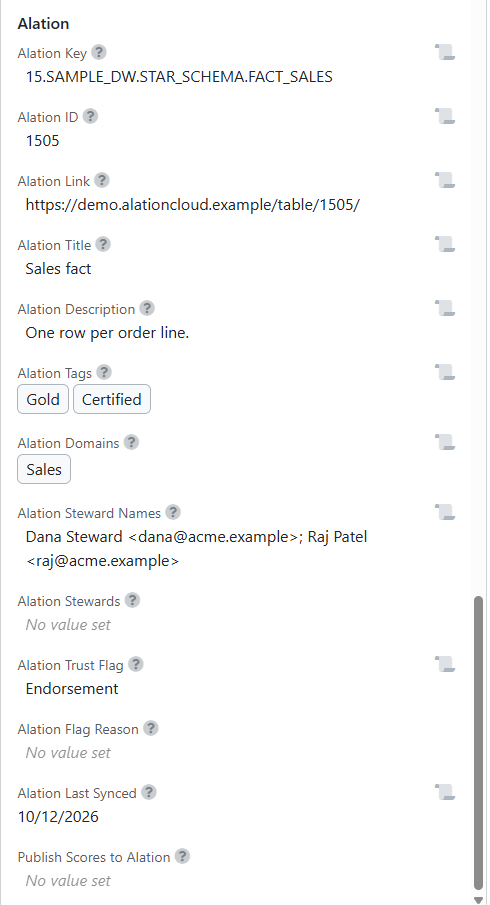
Import the fields
You need Govern Edition and the Global Custom Metadata Admin role.
From the marketplace (recommended)
- In Validatar, open Marketplace and find Alation - Catalog Custom Fields.
- Choose Get, then Import Directly. Validatar opens Settings > Catalog Custom Fields with the Alation section ready to import.
- Choose Import All, then Save.
- Check the Data Source, Schema, Table and Column levels on that page. Each should now have an Alation section with the fields listed above.
From the downloaded file
If a level has no Alation section after the marketplace import, or you are moving the set between Validatar instances:
- Choose Get, then Download XML.
- In Settings > Catalog Custom Fields, open the level, choose Import, select the file and choose Next.
- Choose Import All, then Save. Repeat for each level.
Note: Import before the first run of the metadata script. Validatar ignores a script column whose field does not exist, so the run succeeds but the value is not stored.
Add your own Alation fields
To bring another Alation custom field across, such as Data Owner, add a table-level field in the Alation section with a reference key that no other level uses, for example alation_data_owner. Then name it in the metadata script:
ALATION_CUSTOM_FIELDS = {
    "Data Owner": "alation_data_owner",
}
Use Short text unless you know every value Alation can send. A Dropdown field rejects the whole run when Alation sends a value that is not one of its options.