Overview
Two Python scripts bring what Alation knows about your warehouse into Validatar:
alation_custom_metadata.pyfills the Alation section of the Validatar catalog on one warehouse data source: Alation keys and links, titles, descriptions, tags, domains, steward names, trust flags and any Alation custom fields you name, at data source, schema, table and, optionally, column level.alation_lineage.pyloads Alation lineage between the data sources you list as Validatar lineage, so a failed test shows what sits downstream.
They are part of the Alation Integration. Publishing Validatar results to Alation is done by the Alation Data Source Template, not by these scripts.
Marketplace: Alation Metadata and Lineage Scripts (a download; it is not imported)
What is in the download
| File | What it is |
|---|---|
alation_custom_metadata.py |
The metadata script. Paste it into a Custom Metadata source on a warehouse data source |
alation_lineage.py |
The lineage script. Paste it into a Lineage Ingestion source |
alation_helpers.py |
Shared code for running either script from the command line. Inside Validatar the Alation data source template provides the same code |
README.md, README.docx |
The full guide: every setting, every field filled, setup steps and troubleshooting |
How the pieces fit
Every Alation connection in Validatar uses the Alation data source template with the same settings: the same Alation URL and the same credentials. What differs from one warehouse to the next sits at the top of the script, in plain Python:
# ---- 1. WHICH ALATION DATA SOURCE ----
ALATION_DATA_SOURCE_ID = 7       # the number in the Alation URL: /data/7/
ONLY_SCHEMAS = []                # e.g. ["PUBLIC", "FINANCE"]; empty means all
Below that, section 2 switches each field on or off, and a block describes the dataframes the script returns, with an example row. The template's pre-execution script carries the shared code (the Alation and Validatar API clients, name matching, paging and retries), so the script itself stays short enough to read.
To connect another warehouse, copy the script into that data source's Custom Metadata source and change section 1. Each process has its own connection, so enter the same Alation settings on each.
Before you start
- From the marketplace, import the Alation Data Source Template and the Alation Catalog Custom Fields. The fields must exist before the first run: Validatar ignores a script column that has no field with the same reference key.
- In Alation: Catalog Admin reads everything the scripts need, including lineage on Alation 2026.4.1 and later. Server Admin is needed only to read the user emails behind the steward fields.
- In Validatar: Govern Edition for catalog custom fields; for lineage, the Data Lineage feature and the Global Lineage Metadata Admin role.
- Run technical metadata ingestion on your warehouse data sources first. The scripts only write to schemas, tables and columns that Validatar has cataloged.
What the metadata script brings back
| Level | Fields |
|---|---|
| Data source | Alation Data Source ID, Alation Data Source Link, Alation Connector, Alation Data Source Synced |
| Schema | Alation Schema Key, Link, Description, Domains (the domains of its tables), Synced |
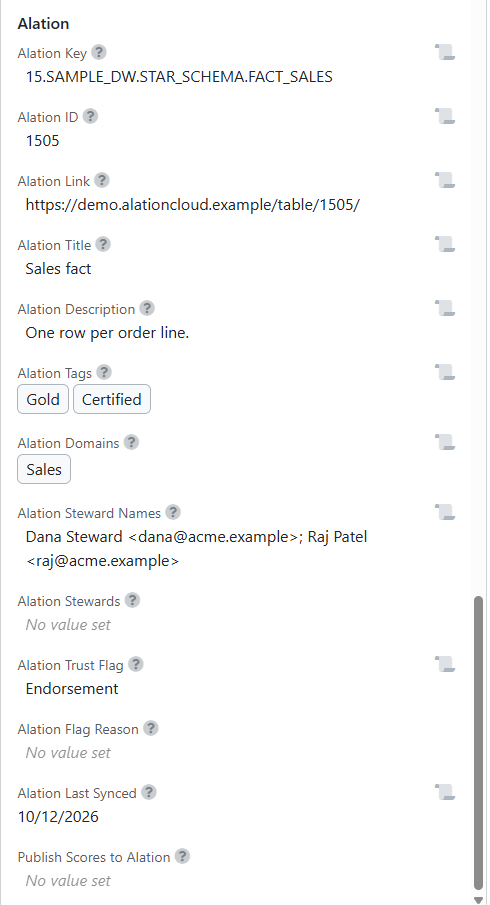
| Table | Alation Key, ID, Link, Title, Description, Tags, Domains, Steward Names, Trust Flag (None, Endorsement, Warning, Deprecation or Multiple), Flag Reason, Last Synced |
| Column (optional) | Alation Column Key, Link, Description, Tags, Synced |
Section 2 of the script controls what comes back:
| Setting | What it does |
|---|---|
TABLE_FIELDS, SCHEMA_FIELDS, DATA_SOURCE_FIELDS, COLUMN_FIELDS |
Turn each field on (True) or off (False). An off field is not sent, so a value set some other way is kept |
INCLUDE_COLUMNS |
Add column-level values. Off by default, because it costs one Alation call per table |
ALATION_CUSTOM_FIELDS |
Copy Alation custom fields onto tables: {"Data Owner": "alation_data_owner"}. Create each Validatar field first |
STEWARDS_AS_VALIDATAR_USERS, VALIDATAR_USER_NAMES |
Also fill the user/group field Alation Stewards, for the stewards you list by Validatar user name |
Validatar rejects the whole run if one value in a user/group field is not a Validatar user, or if a Dropdown field receives a value that is not one of its options. Those are the two settings to change with care.
Set up the metadata script
- Open the warehouse data source and go to Custom Metadata > Metadata Sources > New Source > New Query Source.
- Untick Same as primary and Add a connection: Python Script, template Alation, your Alation settings.
- Configure Ingestion Script: paste
alation_custom_metadata.py, set section 1, and tick Ignore Missing Metadata Objects so Alation objects Validatar has not cataloged are skipped. - Preview Script shows the rows for each level before anything is written.
- Save, Refresh Now, then Set Refresh Schedule (usually daily).
Set up the lineage script
In section 1, list each Alation data source with the Validatar data source for the same warehouse:
DATA_SOURCES = [
    (7, 12),     # (Alation data source id, Validatar data source id)
]
LINEAGE_LEVEL = "table"     # or "column"
- Go to Settings > Lineage Metadata > Sources > New Source > New Query Source.
- Add a connection: Python Script, template Alation, the same Alation settings, plus Validatar Base URL and Validatar API Token. The script uses the token to read the catalog, so it only sends edges whose two ends Validatar has cataloged: one unknown table fails a whole lineage batch.
- Configure Ingestion SQL: paste
alation_lineage.py. Preview Script shows the edges. - Run Import. Validatar asks which data source each server and database pair belongs to; confirm and run.
- Set Refresh Schedule (usually weekly).
Each run replaces the sources of every target table it sends, so hand-edited lineage on those tables does not survive the next run.
Try it without Alation
Set Demo Mode to Yes on the Alation connection in Validatar, or set ALATION_DEMO_MODE=1 on the command line. The scripts then answer from a built-in sample Alation instance and nothing is sent to Alation. The sample's data source 15 uses the table names of a common Validatar sample warehouse (STAR_SCHEMA.DIM_CUSTOMER, FACT_SALES, RAW.CLAIM and others) with tags, domains, stewards, trust flags and lineage on them.
Related
- Alation Integration
- Alation Catalog Custom Fields
- Alation Data Source Template
- Alation Instance Health Checks
Note: Both scripts have run end to end inside Validatar against a built-in sample Alation instance. They have not yet run against a live Alation environment, so expect small adjustments after your first live run.