Overview
Collibra is where many organizations govern their data: who owns it, what it means, how it is classified and where it flows. Validatar tests whether that data can be trusted. The Collibra integration connects the two so that each platform shows what the other knows.
- Validatar to Collibra. Validatar's results become Data Quality Rule assets in Collibra. Collibra rolls them up into the External Data Quality section of the Quality tab on each column, table, schema and database, with a link from every rule back to the test in Validatar.
- Collibra to Validatar. Collibra owners and stewards, statuses, tags, business terms, data categories, security classifications, accepted data classes and lineage appear in the Validatar catalog, next to the tests that cover the same data.
The integration runs inside Validatar. It calls Collibra's REST, GraphQL and Import APIs with a client written in plain Python, so there is nothing to install, and it uses Validatar's own scheduling, so there is no separate server, connector or scheduler to maintain.
Get the integration
Five items on the Validatar marketplace make up the integration:
| Marketplace item | What it is | Reference |
|---|---|---|
| Collibra - Data Source Template | The Collibra data source: credentials for both platforms, publishing to Collibra, and a catalog of the Collibra instance itself. Includes a demo mode that answers from a built-in sample instance | Collibra Data Source Template |
| Collibra - Catalog Custom Fields | A Collibra section in the Validatar catalog custom fields, at data source, schema, table and column level, for the values brought in from Collibra | Collibra Catalog Custom Fields |
| Collibra - Project Custom Fields | A Collibra Publishing section on every test, with the five fields that choose which tests are published and where their results land | Collibra Project Custom Fields |
| Collibra Metadata and Lineage Scripts | A download with the two scripts that bring Collibra metadata and lineage into Validatar, the script that prepares Collibra for Validatar's results, and their setup guide | Collibra Metadata and Lineage Scripts |
| Collibra Instance Health Checks | 15 tests that check whether the Collibra instance is working and well governed | Collibra Instance Health Checks |
What appears in Collibra
Collibra has a place for quality results from other tools: Data Quality Rule assets, each with a Passing Fraction attribute and a relation to the column or table it governs. Collibra averages the Passing Fraction of those rules along its quality score aggregation paths and shows the result in the External Data Quality section of each asset's Quality tab. Collibra's documentation directs other tools to its Import API for this, and that is the route Validatar uses.
| Published from Validatar | Where it appears in Collibra |
|---|---|
| A Data Quality Rule per published test, named after the test or a name you choose for Collibra | The Validatar Data Quality domain, and the governed column or table's Quality tab |
| The test's quality score as the rule's Passing Fraction, with the rows loaded, passing and breaking when the test counts rows | The rule's attributes, averaged into the External Data Quality score of the column, then its table, schema and database |
| The test's quality dimension | A relation from the rule to the matching Data Quality Dimension asset, so Collibra can break the score down by dimension |
| The result, when the test last ran, and a link to the test in Validatar | The rule's description |
| Optionally, the table's Validatar trust, quality and coverage scores, last run and a link | Attributes on the Table asset, when an admin adds them to the operating model |
A Collibra admin prepares Collibra once: a community and domain for Validatar's rules, a check of the dimensions and attributes, and one aggregation path for rules that govern whole tables. Collibra Setup for Validatar covers each step, with a setup script that does most of them.
How a rule's score is set
A rule's Passing Fraction is the test's own quality score, set by the test's Scoring Method in Validatar:
| Scoring Method | Passing Fraction |
|---|---|
| All or Nothing | 1 when the test passed, 0 when it failed |
| Proportional | Passed rows divided by total rows in the latest run |
| Proportional with Pass Override | 1 when the test passed, otherwise passed rows divided by total rows |
| Custom Calculation | 1 or 0 by result, because the custom formula is not available to the integration. The rule's description says so |
A test whose latest run errored is not scored: an error means the test could not run, not that the data failed. A test that fails on one row in a million under Proportional scoring shows 99.9999, the same score Validatar uses for its own quality score.
Scores are written as percentages (0 to 100) by default, or as fractions (0 to 1). Which scale Collibra expects for an external tool has not yet been confirmed on a live instance, so the scale is a setting on the Collibra data source.
Note: Collibra keeps the current value of each rule. Score history and trends remain in Validatar, one click away through the link in each rule.
Scores are published after each scheduled test run. Results for tests you mark as critical can be published the moment the test runs, using a test action.
Choosing what to publish
Collibra averages every rule it finds on an asset, so Validatar publishes one level of detail at a time. Publish Scope on the Collibra data source chooses it:
| Publish Scope | Rules published | Passing Fraction |
|---|---|---|
| Trust Score | One rule per table | Validatar's weighted quality score for the table, the same score its trust score is built on |
| Trust + Dimensions | One rule per table and quality dimension | The average quality score of the table's tests in that dimension |
| Trust + Dimensions + Tests (default) | One rule per test | That test's quality score |
Changing the scope replaces the old rules on the next run, so the levels never mix in Collibra's average.
Within the per-test scope:
- Publish Tests decides which tests are published. The default, All tests, publishes every test on a matched table unless its Publish to Collibra field is No. Opted-in tests publishes only tests set to Yes. All tests is the default here, unlike the other catalog integrations, because Collibra builds its score from the rules it receives.
- Test-level fields in a Collibra Publishing section on each test, which the Collibra Project Custom Fields item adds, set the rule's name in Collibra, its dimension, and the Collibra asset it governs, so a column-level test can show on its column.
- Table-level opt-out. Setting Publish Scores to Collibra to No on a table keeps it out of Collibra entirely, for example a staging table that is tested but not meant for catalog users.
When a test stops being published, because it was deleted, opted out or the scope changed, its rule is deleted on the next run so it no longer counts in Collibra's average. The data source can mark such rules Obsolete instead.
New data sources start in Dry Run: the publish step reports what it would write and writes nothing. Turn Dry Run off once the report shows what you expect.
What appears in Validatar
From Collibra, the integration brings in:
- the Collibra asset id, full name and a link to the asset
- the description and the status, such as Accepted, Obsolete or Missing from source
- owners, business stewards and technical stewards, as names and emails
- tags
- business terms that represent the table or column, and data categories
- the security classification and whether Collibra marks the asset as personal data
- data classes accepted by Collibra's data classification, on columns
- the domain and community that hold the asset
- any other Collibra text attribute you name, such as a retention period
- table-level lineage, and optionally column-level lineage
These land in a Collibra section of the Validatar catalog custom fields on the same data sources, schemas, tables and columns, and as Validatar lineage. They sit in their own fields, so Collibra values never overwrite descriptions or tags maintained in Validatar. You choose which fields come across, and for which schemas, at the top of the metadata script.
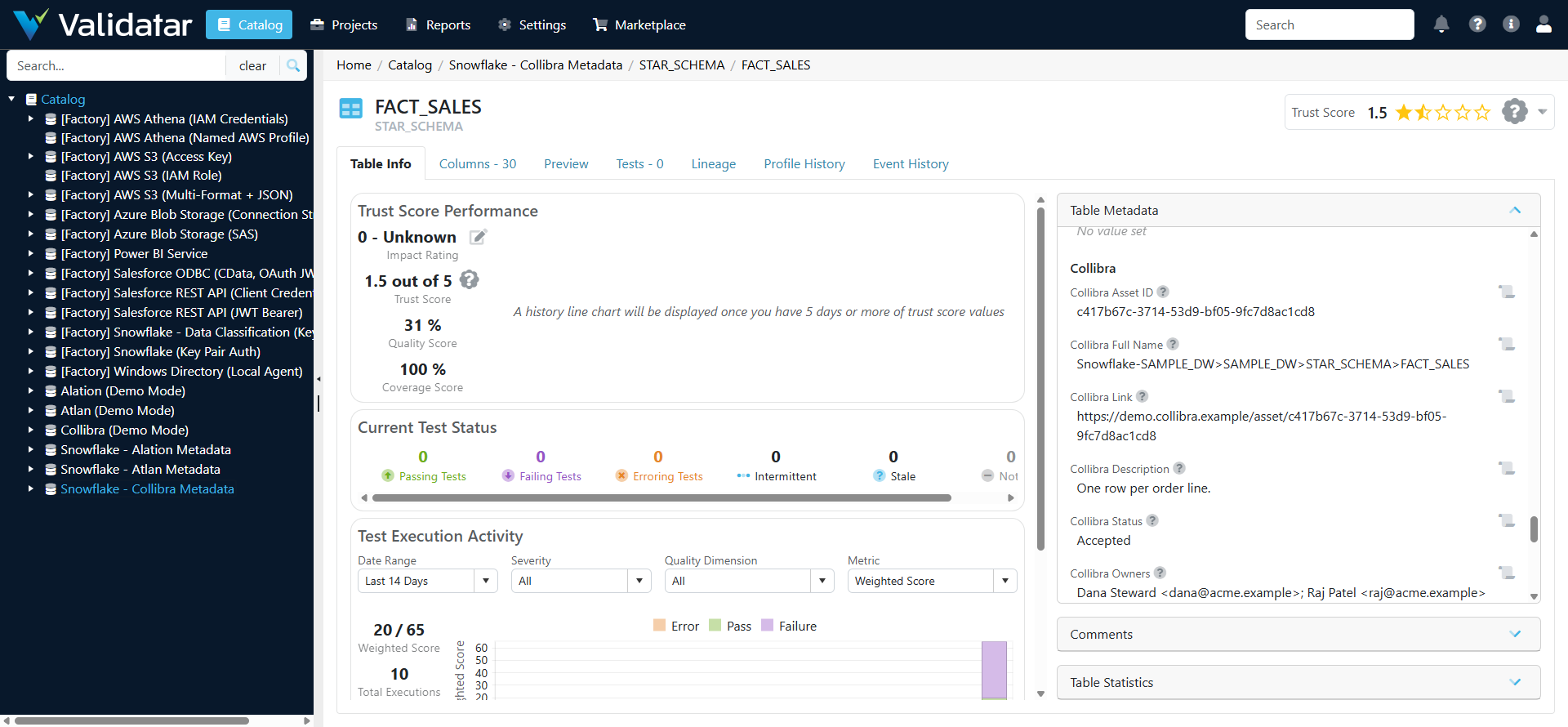
With this context in Validatar, teams can prioritize testing by classification or business term, route failures to the right steward, and see which downstream tables a failed test affects.
How it works
The integration is packaged as a Collibra data source template. It holds the credentials for both the Collibra and Validatar APIs and the code every job shares. Each job runs through a standard Validatar feature, on a connection built from the template with the same Collibra settings:
| Job | Runs in Validatar as | Typical schedule |
|---|---|---|
| Bring in Collibra owners, stewards, statuses, tags, terms and classifications | A Custom Metadata source on each warehouse data source, running the metadata script | Daily |
| Bring in Collibra lineage | A Lineage Ingestion source running the lineage script | Weekly |
| Publish Validatar results as Data Quality Rules | A Python test, using the template's publish macro, placed last in the scheduled test job | After every test run |
| Publish a critical test's result immediately | A test action on that test, using the template's second macro | Each time the test runs |
| Catalog the Collibra instance and check its health | Metadata ingestion on the Collibra data source, then the Collibra Instance Health Checks tests | Daily |
Because the publish step is itself a Validatar test, every publish has a pass or fail history and can alert like any other test.
Checking the health of the Collibra instance
The Collibra data source's own catalog is the Collibra instance: each object type (communities, domains, databases, asset types, business terms, quality dimensions, Validatar's own rules, statuses, tags, roles, Edge sites and connections, recent jobs, workflow instances and tasks) is a schema, and each object is a table whose columns hold its properties. The Collibra Instance Health Checks pack tests that catalog and the Collibra API behind it. It covers Edge sites that are not healthy, failed jobs, databases whose schemas have not been synchronized recently, tables without owners, stewards or descriptions, responsible users who are disabled, business terms without definitions or with duplicates, obsolete tables that still feed others, workflows in error, overdue tasks, near-duplicate tags, unreviewed data class suggestions, and whether Validatar's own publishing into Collibra is current.
Trying it without Collibra
Turn on Demo Mode on the Collibra data source and every Collibra call is answered by a built-in sample instance: a fictional company with three databases registered through Edge and a few deliberate problems. The object catalog, the health checks, the scripts and the publish step all run against it, and nothing is sent to Collibra.
Matching the two catalogs
Collibra names every physical asset by its full name, which starts with the Edge connection and the database: Snowflake-Connection>SAMPLE_DW>STAR_SCHEMA>FACT_SALES is a table, and its columns end in (column). Each job pairs a Validatar data source with a Collibra database by that prefix, then matches schemas, tables and columns by name within the pair. The metadata and lineage scripts name their database at the top of the script; publishing uses a connection map on the Collibra data source. The Collibra data source's own catalog lists every database with its full name, so the pairs are built from what Collibra reports. Once the metadata script has run, each table's Collibra asset id is stored in Validatar and publishing uses it directly. Objects found on one side and not the other are counted and reported, never silently dropped.
Requirements
Collibra
- Collibra Platform 2024.02 or later, SaaS or self-hosted. The integration reads in bulk through Collibra's Knowledge Graph GraphQL API, which became generally available in 2024.02.
- An integration identity: an Integration OAuth application (the default), or a Collibra user name and password for Basic sign-in on self-hosted or older instances.
- For that identity: read access to the physical data dictionary domains of the databases in scope, and a role that can create and edit assets in the Validatar Data Quality domain. Some health checks also need roles that can list users and see other users' jobs and tasks.
- A Collibra admin to prepare the Validatar domain once and add one aggregation path, as described in Collibra Setup for Validatar.
Validatar
- A Validatar API token for the integration, used to publish and by the lineage script
- Govern Edition, to define the integration's custom fields
- The Data Lineage feature, to bring in Collibra lineage
- The Standard Test Actions optional feature, to publish critical test results the moment they run
Both platforms communicate over HTTPS. The integration needs no extra Python packages; the scripts run wherever the instance runs Python.
Rollout
Most teams adopt the integration in stages. Each stage is useful by itself.
- Prepare. Agree the decisions below, create credentials on both sides, run the setup script in Collibra and map data sources.
- Publish table scores. Add the publish step to the daily test job with Trust Score scope, run it in Dry Run, then turn Dry Run off. Tested tables in Collibra now show an External Data Quality score.
- Publish dimensions or tests. Import the project custom fields, move to Trust + Dimensions or Trust + Dimensions + Tests, and add test actions to critical tests.
- Bring in Collibra metadata. Import the Collibra custom fields, then add the metadata script to each warehouse data source.
- Bring in lineage. Start with table-level lineage, then add columns where needed.
Decisions to make before setup
| Decision | Common starting point |
|---|---|
| Which data sources are in scope | The two or three warehouses Validatar tests most |
| How the integration signs in to Collibra | One Integration OAuth application for Validatar alone |
| Publish scope | Trust Score for the first week, then Trust + Dimensions + Tests |
| Which tests are published | All tests, with a few kept out through their Publish to Collibra field |
| Passing Fraction scale | The scale your other Collibra quality scores use |
| What happens to rules that are no longer published | Delete |
| How Validatar's dimensions map to your Data Quality Dimension assets | By name, with a map for the ones your operating model calls something else |
| Whether to add the optional table score attributes | Off; rules only |
| Which Collibra attributes to bring into Validatar | Two to five that affect test priority, such as a retention period or a criticality rating |
| Lineage depth | Table level |
What has been tested
The integration has been built from Collibra's documentation and its published OpenAPI specifications. Its offline test suite runs every health check, both scripts and every publish scope against a built-in sample instance, checks every REST call it makes against Collibra's specifications, and runs the publish step through its real HTTP client against a local server that answers like the sample instance.
Inside Validatar, against the same sample instance, the template imported from the Validatar marketplace and the 15 health checks gave their 21 designed results. The metadata script filled the Collibra fields on a Snowflake data source (6 data source, 12 schema, 102 table and 78 column values), and the lineage script loaded 4 table edges. Both publishing paths ran with Dry Run off: the publish step in a test job, and the test action for a single test. All five items import from the Validatar marketplace.
The integration has not yet been run against a live Collibra instance.
Related
- Collibra Data Source Template
- Collibra Setup for Validatar
- Collibra Instance Health Checks
- Collibra Metadata and Lineage Scripts
- Collibra Catalog Custom Fields
- Collibra Project Custom Fields
- What Is a Data Source Template?
- What are Test Actions
- How Trust Scores Are Calculated
- Quality Dimensions
- Configuring Custom Fields
Note: This article describes the design of the Validatar and Collibra integration. It has been built from Collibra's documentation and published OpenAPI specifications, and tested offline and against a built-in sample Collibra instance. It has not yet been run against a live Collibra instance, so setup details may change after that validation. To discuss using it, contact your Validatar account team.