Overview
Every database platform has its own set of data types — SQL Server has NVARCHAR, BIGINT, and DATETIME2; Snowflake has VARIANT, NUMBER(38,0), and TIMESTAMP_NTZ; PostgreSQL has JSONB, SERIAL, and TIMESTAMPTZ. Validatar needs to understand these platform-specific types so it can classify columns correctly for profiling, test recommendations, and catalog display.
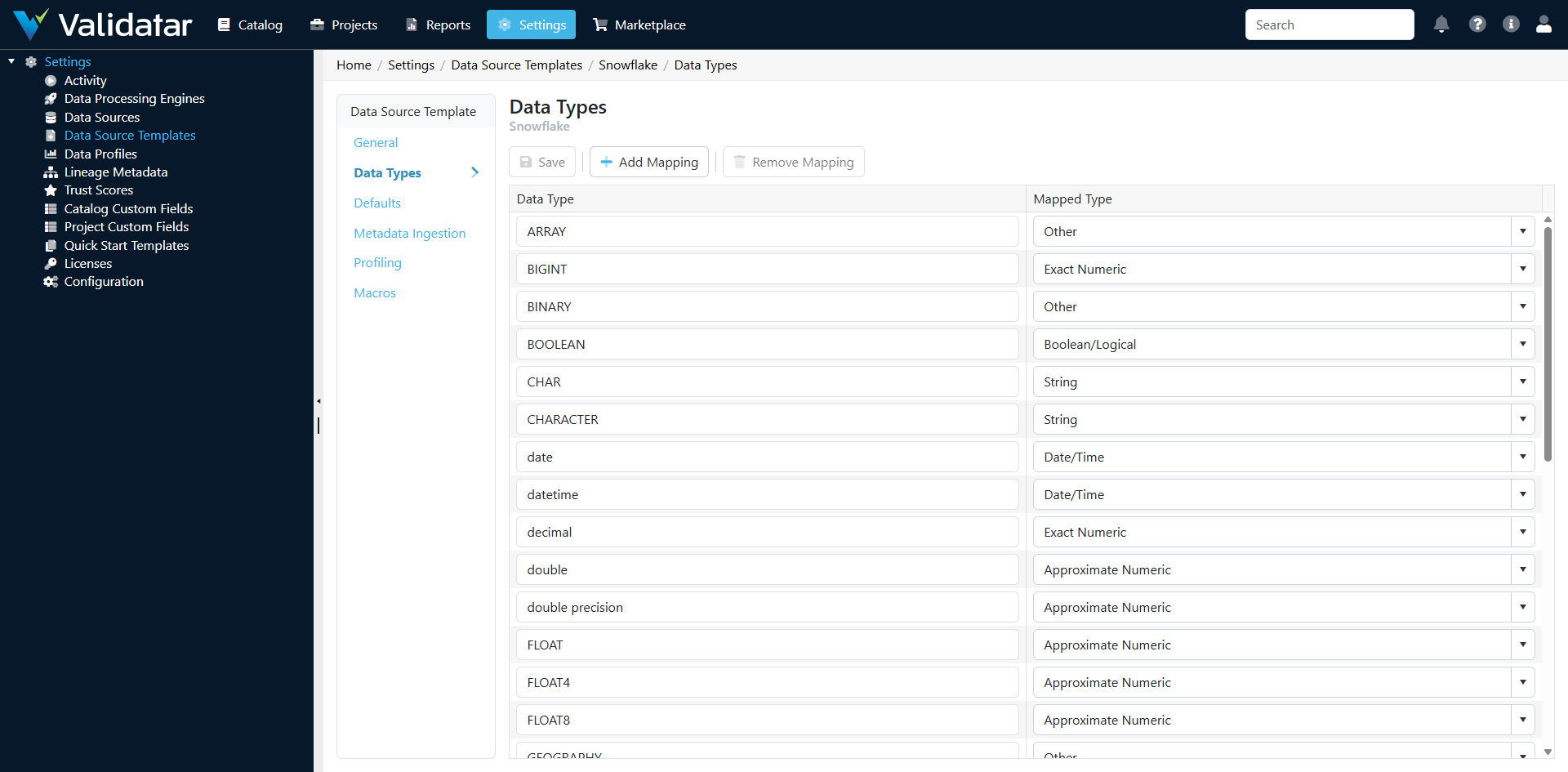
The Data Types tab on a data source template maps each engine-specific data type to one of Validatar's internal metadata types. When metadata ingestion discovers columns in your data source, it uses these mappings to assign each column a classification that Validatar understands.
Why Data Type Mappings Matter
Correct data type mappings affect several downstream behaviors:
Profiling
Data profiles are type-sensitive. A distinct_count profile applies to all columns, but mean, median, and standard_deviation only apply to numeric columns. blank_count and blank_percent only apply to string columns. If a VARCHAR column isn't mapped correctly, Validatar won't know to offer string-specific profiles for it.
Test Recommendations
When Validatar recommends tests for your data, it considers data types. A column classified as a date type might get a "no future dates" recommendation. A numeric column might get an outlier detection recommendation. Incorrect mappings lead to irrelevant recommendations or missed opportunities.
Catalog Display
The Validatar catalog shows column data types in the data explorer. Mappings determine how columns are categorized, filtered, and displayed to users browsing the catalog.
Profile Condition Expressions
Profile definitions can include condition expressions that restrict which columns they apply to. These conditions often reference the internal data type. For example, a profile might have a condition like "only apply to numeric types" — which depends entirely on the type mapping being correct.
How Mappings Work
Each row in the Data Types grid maps a single engine-specific type name to a Validatar internal type:
| Field | Description |
|---|---|
| Engine Type Name | The exact data type name as reported by the platform's system catalogs (e.g., varchar, int, timestamp_ntz) |
| Validatar Type | The internal classification Validatar assigns to columns of this type |
Validatar's internal types are broad categories:
| Internal Type | Covers |
|---|---|
| String | Text types: VARCHAR, CHAR, NVARCHAR, TEXT, STRING, etc. |
| Integer | Whole number types: INT, BIGINT, SMALLINT, TINYINT, etc. |
| Decimal | Fractional number types: DECIMAL, NUMERIC, FLOAT, DOUBLE, REAL, etc. |
| Date | Date-only types: DATE |
| DateTime | Date and time types: DATETIME, TIMESTAMP, DATETIME2, etc. |
| Time | Time-only types: TIME |
| Boolean | Boolean types: BIT, BOOLEAN, BOOL |
| Binary | Binary types: VARBINARY, BINARY, BLOB, BYTEA, etc. |
| Other | Types that don't fit other categories: XML, JSON, VARIANT, GEOGRAPHY, etc. |
Note: The engine type name must match exactly what the metadata ingestion scripts return. If your ingestion SQL returns
varchar(lowercase), the mapping must usevarchar— notVARCHAR. Case sensitivity depends on your platform.
Managing Data Type Mappings
Adding a Mapping
To add a new type mapping:
- Open the template and navigate to the Data Types tab
- Click Add to create a new row
- Enter the engine type name exactly as it appears in your platform's system catalogs
- Select the appropriate Validatar internal type from the dropdown
- Save
When to Add Mappings
You need to add a mapping when:
- Your platform has a data type not already mapped (e.g., a custom type or a type from a newer database version)
- Metadata ingestion returns columns with unmapped types (these will show as unclassified in the catalog)
- You're building a new template from scratch
Editing and Removing Mappings
You can modify existing mappings by changing the Validatar type assignment or removing mappings that don't apply. Be cautious when modifying mappings on a template that's already in use — changing a mapping won't retroactively update columns that were already ingested. You'll need to re-run metadata ingestion on affected data sources to pick up the updated classification.
Common Patterns by Platform
SQL Server
SQL Server has a large type system. Key mappings to get right:
nvarchar,varchar,nchar,char,text,ntext→ Stringint,bigint,smallint,tinyint→ Integerdecimal,numeric,float,real,money,smallmoney→ Decimaldate→ Datedatetime,datetime2,smalldatetime,datetimeoffset→ DateTimetime→ Timebit→ Booleanvarbinary,binary,image→ Binaryxml,uniqueidentifier,sql_variant,geography,geometry→ Other
Snowflake
Snowflake's type system is simpler but has some unique types:
VARCHAR,STRING,TEXT,CHAR→ StringNUMBER(with scale 0),INTEGER,BIGINT→ IntegerNUMBER(with scale > 0),FLOAT,DOUBLE,DECIMAL→ DecimalDATE→ DateTIMESTAMP_NTZ,TIMESTAMP_LTZ,TIMESTAMP_TZ→ DateTimeTIME→ TimeBOOLEAN→ BooleanBINARY,VARBINARY→ BinaryVARIANT,OBJECT,ARRAY→ Other
Tip: When setting up a Snowflake template, pay attention to
NUMBERtypes. Snowflake usesNUMBER(38,0)as its default integer type. Whether this maps to Integer or Decimal depends on the scale — aNUMBER(38,0)is effectively an integer, whileNUMBER(10,2)is a decimal.
PostgreSQL
PostgreSQL has many aliases for the same underlying types:
varchar,character varying,text,char,character→ Stringinteger,int4,bigint,int8,smallint,int2,serial,bigserial→ Integernumeric,decimal,real,float4,double precision,float8→ Decimaldate→ Datetimestamp,timestamp without time zone,timestamp with time zone,timestamptz→ DateTimetime,time without time zone,time with time zone→ Timeboolean,bool→ Booleanbytea→ Binaryjson,jsonb,xml,uuid,inet,cidr,macaddr→ Other
How This Fits Into the Bigger Picture
Data type mappings are the bridge between your platform's type system and Validatar's internal classification. They directly influence the accuracy of profiling, the relevance of test recommendations, and the usability of the data catalog. Getting them right early saves troubleshooting later.
For the complete view of how data types work alongside ingestion, profiling, and macros, see Data Source Templates: The Complete Picture.