Overview
Python-based data source templates take a different approach to profiling than their SQL counterparts. Instead of defining individual profile definitions with SQL aggregate expressions, Python templates use profile scripts — complete Python scripts that connect to the data source, calculate metrics, and return results as pandas DataFrames.
This approach gives you full control over how profiling works for non-SQL data sources: APIs, file systems, cloud storage, and custom platforms can all be profiled using the same Python libraries used for metadata ingestion.
This article covers profiling configuration for Script category templates. For SQL-based templates, see Profiling Configuration — SQL Templates.
The Profiling Tab — Python Templates
Open a Python-based template and navigate to the Profiling tab. Instead of a list of profile definitions, you'll see profile scripts — complete Python scripts that calculate profiling metrics.
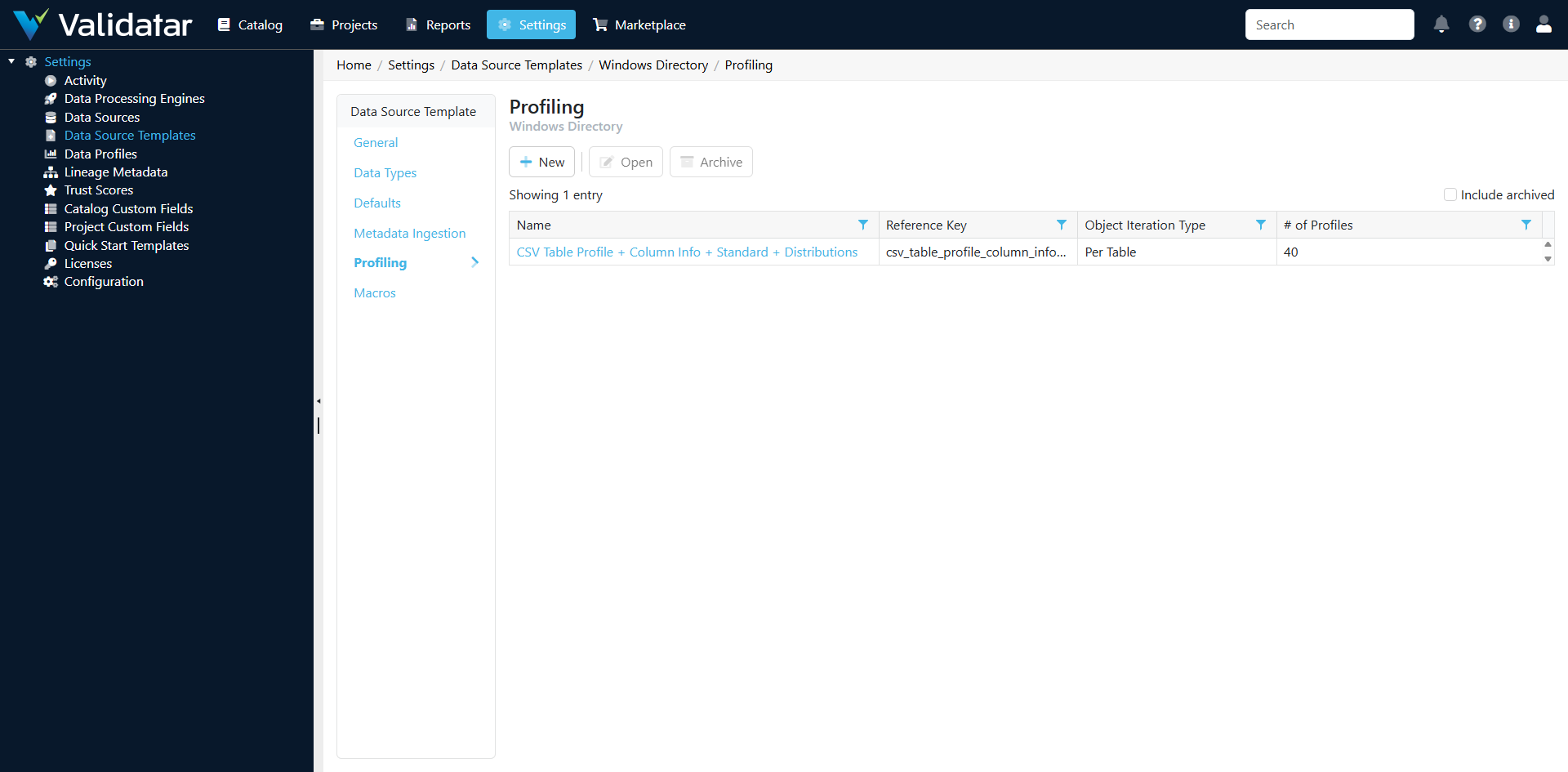
How Python Profiling Differs from SQL Profiling
| Aspect | SQL Templates | Python Templates |
|---|---|---|
| Configuration unit | Individual profile definitions (one per metric) | Profile scripts (one script can calculate many metrics) |
| Execution | SQL expressions run against the database | Python scripts run in Validatar's Python runtime |
| Batching | Validatar automatically batches multiple profiles into efficient queries | The script controls how metrics are calculated and batched |
| Data access | Direct SQL against the data source | Through Python libraries (requests, pandas, file I/O, etc.) |
| Parameters | Not applicable (SQL uses table/column placeholders) | Template parameters from the Defaults tab are available |
| Result format | Defined per profile definition | DataFrames with expected column structure |
Profile Scripts
A profile script is a complete Python program that:
- Accesses template parameters for connection details
- Connects to the data source
- Reads or queries data to calculate metrics
- Returns results in two pandas DataFrames with a specific structure
Expected Output Structure
Profile scripts leave two DataFrames in scope, named exactly as below. Validatar reads table-level profiles from the first and column-level profiles from the second, and reports an error when a frame the selected profiles need is missing.
| DataFrame | Columns |
|---|---|
table_profile_dataframe |
schema_name, table_name, profile_reference_key, grouping_key, profile_value |
column_profile_dataframe |
schema_name, table_name, column_name, profile_reference_key, grouping_key, profile_value |
| Column | Description |
|---|---|
schema_name |
The schema the profiled object belongs to |
table_name |
The table or collection being profiled |
column_name |
The column (column frame only) |
profile_reference_key |
The reference key of the profile definition (e.g., record_count, null_count) |
grouping_key |
For array profiles, the grouping dimension; None otherwise |
profile_value |
The profile result value |
A profile script runs once per object at its iteration level (for example once per table), and it must list the profile definitions it produces; a script that lists none runs and stores nothing. Template parameters are available as Python variables named by their reference keys.
Example: Profiling a CSV File Source
import pandas as pd
import os

# Template parameters are variables named by their reference keys
# (directory_path is a parameter of this example template)

results = []

# Profile each CSV file (each file is a "table")
schema_name = os.path.basename(directory_path)

for filename in os.listdir(directory_path):
    if not filename.endswith('.csv'):
        continue

    filepath = os.path.join(directory_path, filename)
    table_name = os.path.splitext(filename)[0]

    # Read the file
    df = pd.read_csv(filepath)

    # Table-level profiles
    results.append({
        'schema_name': schema_name,
        'table_name': table_name,
        'column_name': None,
        'profile_reference_key': 'record_count',
        'grouping_key': None,
        'profile_value': str(len(df))
    })

    results.append({
        'schema_name': schema_name,
        'table_name': table_name,
        'column_name': None,
        'profile_reference_key': 'column_count',
        'grouping_key': None,
        'profile_value': str(len(df.columns))
    })

    # Column-level profiles
    for col in df.columns:
        # Null count
        null_count = int(df[col].isnull().sum())
        results.append({
            'schema_name': schema_name,
            'table_name': table_name,
            'column_name': col,
            'profile_reference_key': 'null_count',
            'grouping_key': None,
            'profile_value': str(null_count)
        })

        # Null percent
        null_pct = round(null_count / len(df), 4) if len(df) > 0 else 0  # a fraction: 0.125 shows as 12.5%
        results.append({
            'schema_name': schema_name,
            'table_name': table_name,
            'column_name': col,
            'profile_reference_key': 'null_percent',
            'grouping_key': None,
            'profile_value': str(null_pct)
        })

        # Distinct count
        distinct_count = int(df[col].nunique())
        results.append({
            'schema_name': schema_name,
            'table_name': table_name,
            'column_name': col,
            'profile_reference_key': 'distinct_count',
            'grouping_key': None,
            'profile_value': str(distinct_count)
        })

        # Min and max for numeric columns
        if pd.api.types.is_numeric_dtype(df[col]):
            results.append({
                'schema_name': schema_name,
                'table_name': table_name,
                'column_name': col,
                'profile_reference_key': 'min_numeric',
                'grouping_key': None,
                'profile_value': str(df[col].min())
            })
            results.append({
                'schema_name': schema_name,
                'table_name': table_name,
                'column_name': col,
                'profile_reference_key': 'max_numeric',
                'grouping_key': None,
                'profile_value': str(df[col].max())
            })

profiles = pd.DataFrame(results, columns=['schema_name', 'table_name', 'column_name',
                                         'profile_reference_key', 'grouping_key', 'profile_value'])
table_profile_dataframe = profiles[profiles['column_name'].isna()].drop(columns=['column_name'])
column_profile_dataframe = profiles[profiles['column_name'].notna()]
Example: Profiling a REST API Source
import pandas as pd
import requests

# Template parameters are variables named by their reference keys
base_url = api_base_url

headers = {'Authorization': f'Bearer {api_key}'}

results = []

# Get list of endpoints to profile
endpoints = [
    {'schema': 'core', 'table': 'users', 'url': f'{base_url}/api/users'},
    {'schema': 'core', 'table': 'orders', 'url': f'{base_url}/api/orders'},
]

for endpoint in endpoints:
    try:
        # Get record count via API (many APIs support count endpoints)
        count_response = requests.get(
            f"{endpoint['url']}/count",
            headers=headers,
            timeout=30
        )
        if count_response.ok:
            count = count_response.json().get('count', 0)
            results.append({
                'schema_name': endpoint['schema'],
                'table_name': endpoint['table'],
                'column_name': None,
                'profile_reference_key': 'record_count',
                'grouping_key': None,
                'profile_value': str(count)
            })

        # Get a sample to profile fields
        sample_response = requests.get(
            f"{endpoint['url']}?limit=1000",
            headers=headers,
            timeout=60
        )
        if sample_response.ok:
            data = sample_response.json().get('data', [])
            if data:
                df = pd.DataFrame(data)

                for col in df.columns:
                    null_count = int(df[col].isnull().sum())
                    results.append({
                        'schema_name': endpoint['schema'],
                        'table_name': endpoint['table'],
                        'column_name': col,
                        'profile_reference_key': 'null_count',
                        'grouping_key': None,
                        'profile_value': str(null_count)
                    })

                    distinct_count = int(df[col].nunique())
                    results.append({
                        'schema_name': endpoint['schema'],
                        'table_name': endpoint['table'],
                        'column_name': col,
                        'profile_reference_key': 'distinct_count',
                        'grouping_key': None,
                        'profile_value': str(distinct_count)
                    })

    except requests.exceptions.RequestException:
        continue  # Skip endpoints that fail

profiles = pd.DataFrame(results, columns=['schema_name', 'table_name', 'column_name',
                                         'profile_reference_key', 'grouping_key', 'profile_value'])
table_profile_dataframe = profiles[profiles['column_name'].isna()].drop(columns=['column_name'])
column_profile_dataframe = profiles[profiles['column_name'].notna()]
How Template Profile Scripts Flow to Data Sources
The relationship between template profile scripts and data source profile sets follows the same pattern as SQL templates:
- Template defines profile scripts (the available profiling logic)
- Data source has profile sets that determine what to profile and when
- Profile sets reference the template's profiling capabilities
- Execution uses the Python scripts defined on the template
Note: Profile scripts on Python templates are less granular than SQL profile definitions. A single script often calculates many metrics at once, whereas SQL templates have one definition per metric. Profile sets on data sources using Python templates may offer fewer individual toggle options as a result.
Tips for Writing Profile Scripts
Handle Missing Data Gracefully
External data sources may return incomplete data. Always check for null values, empty responses, and unexpected data types before calculating metrics:
if len(df) > 0 and col in df.columns:
    # Safe to calculate
    null_pct = round(df[col].isnull().sum() / len(df) * 100, 2)
Use Consistent Profile Keys
Use the same profile reference keys as the built-in SQL profile definitions (record_count, null_count, distinct_count, etc.). This ensures consistent display in the data explorer and compatibility with profile-based test data sets.
Respect API Rate Limits
Profiling can involve many API calls, especially when profiling multiple endpoints or fetching sample data. Implement appropriate rate limiting:
import time

for endpoint in endpoints:
    # ... profile the endpoint ...
    time.sleep(0.5)  # Respect rate limits
Return Values in the Profile Definition's Format
profile_value can hold numbers or strings. Validatar converts it according to the profile definition's format: numbers for counts and numeric minimums, dates for date profiles, text for string profiles. Percent profiles take a fraction, so 0.125 displays as 12.5%.
Scope Profiling Appropriately
For large data sources (many files, many API endpoints), consider limiting profiling to a manageable subset or sampling data rather than reading every record. Profile sets can control which objects are profiled, but the script itself should also be resilient to large data volumes.
How This Fits Into the Bigger Picture
Python profile scripts extend Validatar's profiling capabilities to any data source that Python can reach. The profile results they produce are stored and displayed identically to SQL-based profile results — users browsing the data explorer or configuring trust scores see the same metrics regardless of whether they came from a SQL aggregate expression or a Python script.
For more on how profile sets work at the data source level, see Profile Sets. For the complete template overview, see Data Source Templates: The Complete Picture.