Overview
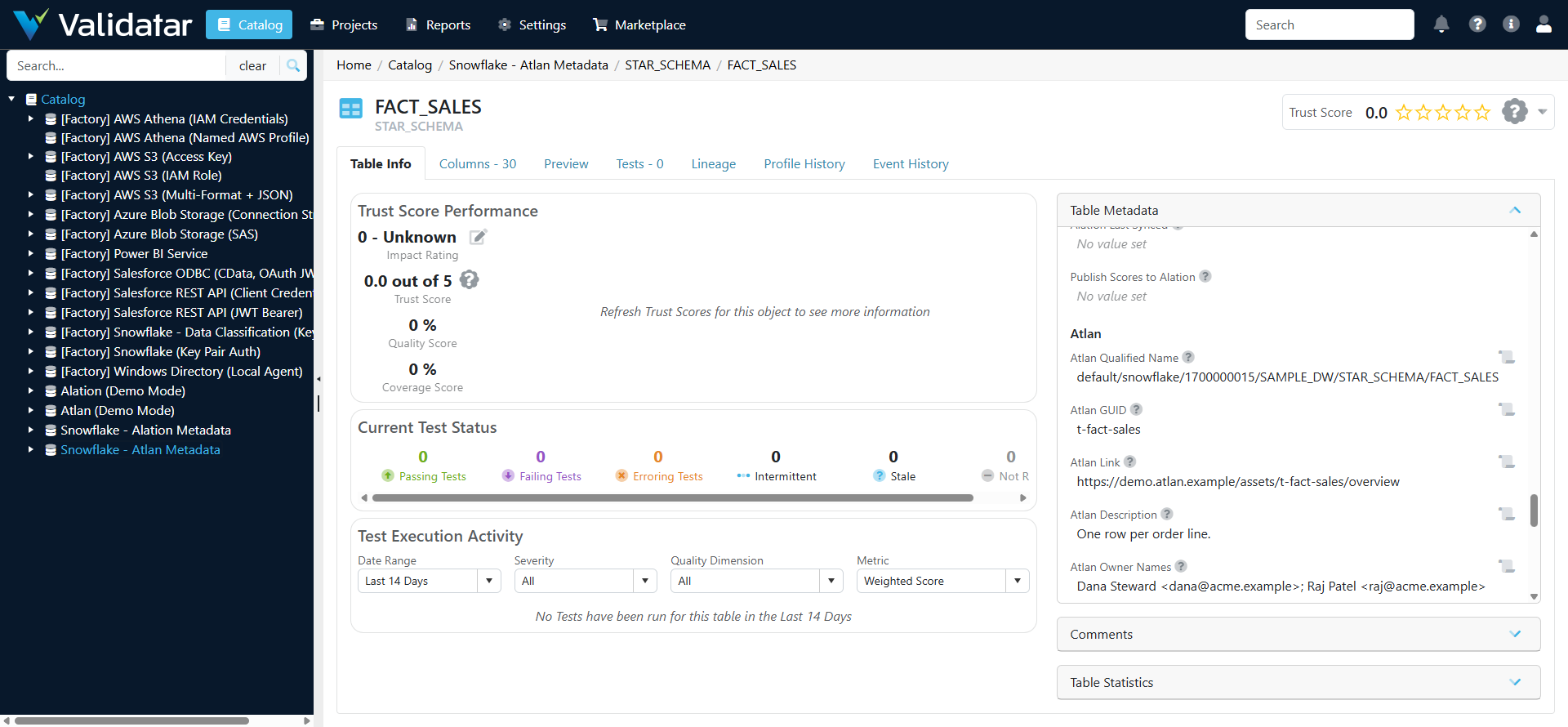
The Atlan - Catalog Custom Fields set adds an Atlan section to the Validatar catalog at data source, schema, table and column level. These fields hold what Atlan knows about each object: its qualified name and link, description, owners, tags, glossary terms, certificate, announcement, data domains and data products.
The Atlan metadata script fills the fields from Atlan. The Atlan Data Source Template reads two of them when it publishes Validatar results to Atlan. Both are part of the Atlan Integration.
Marketplace: Atlan - Catalog Custom Fields
Atlan descriptions, tags and owners land in their own fields. Validatar's own Description, Tags and Owner are never touched, so nothing your team maintains in Validatar is overwritten.
Note: These are Validatar fields: they hold Atlan's metadata inside Validatar. Results travel the other way into the Validatar custom metadata set, which an Atlan admin creates in Atlan. That set is covered in Atlan Custom Metadata for Validatar.
Fields
| Level | Field | Reference key | Type | What it holds |
|---|---|---|---|---|
| Data source | Atlan Connection Qualified Name | atlan_connection_qualified_name |
Short text | The Atlan connection the data source is enriched from, such as default/snowflake/1657025257 |
| Data source | Atlan Connection Name | atlan_connection_name |
Short text | The connection's name in Atlan |
| Data source | Atlan Connector | atlan_connector |
Short text | The Atlan connector that crawls the data source, such as snowflake |
| Data source | Atlan Connection Link | atlan_connection_url |
Short text | Link to the connection in Atlan |
| Data source | Atlan Data Source Synced | atlan_data_source_synced |
Date | When the metadata script last updated the data source |
| Schema | Atlan Schema Qualified Name | atlan_schema_qualified_name |
Short text | Atlan's qualified name for the schema |
| Schema | Atlan Schema Link | atlan_schema_url |
Short text | Link to the schema in Atlan |
| Schema | Atlan Schema Description | atlan_schema_description |
Paragraph | The schema's description in Atlan |
| Schema | Atlan Schema Tags | atlan_schema_tags |
Tag list | Atlan tags on the schema |
| Schema | Atlan Schema Domains | atlan_schema_domains |
Tag list | Data domains of the schema or of its tables |
| Schema | Atlan Schema Synced | atlan_schema_synced |
Date | When the metadata script last updated the schema |
| Table | Atlan Qualified Name | atlan_qualified_name |
Short text | Atlan's qualified name for the table, such as default/snowflake/1657025257/SALES_DB/PUBLIC/ORDERS |
| Table | Atlan GUID | atlan_guid |
Short text | Atlan's id for the table |
| Table | Atlan Link | atlan_url |
Short text | Link to the table in Atlan |
| Table | Atlan Description | atlan_description |
Paragraph | The user description in Atlan, else the crawled one |
| Table | Atlan Owner Names | atlan_owner_names |
Paragraph | Owners as text: Dana Steward <dana@acme.com>; group Data Stewards |
| Table | Atlan Owners | atlan_owners |
User/group list | Owners who are also Validatar users. Optional |
| Table | Atlan Tags | atlan_tags |
Tag list | Atlan tags assigned directly to the table |
| Table | Atlan Propagated Tags | atlan_propagated_tags |
Tag list | Tags the table inherits through lineage or hierarchy |
| Table | Atlan Terms | atlan_terms |
Tag list | Glossary terms linked to the table |
| Table | Atlan Certificate | atlan_certificate |
Dropdown: Verified, Draft, Deprecated, None | The table's certificate in Atlan |
| Table | Atlan Certificate Message | atlan_certificate_message |
Paragraph | The message on the certificate |
| Table | Atlan Announcement | atlan_announcement |
Paragraph | The current announcement: type, title and message |
| Table | Atlan Domains | atlan_domains |
Tag list | Data domains the table belongs to |
| Table | Atlan Data Products | atlan_data_products |
Tag list | Data products the table is part of |
| Table | Atlan Popularity | atlan_popularity |
Short text | Popularity score and read count, such as 8.2 (1250 reads), where Atlan mines usage |
| Table | Atlan Last Crawled | atlan_last_crawled |
Date | When Atlan last crawled the table |
| Table | Atlan Last Synced | atlan_last_synced |
Date | When the metadata script last updated the table |
| Table | Publish Scores to Atlan | atlan_publish_scores |
Dropdown: Yes, No | Set to No to keep the table out of Atlan when Validatar publishes |
| Column | Atlan Column Qualified Name | atlan_column_qualified_name |
Short text | Atlan's qualified name for the column |
| Column | Atlan Column Link | atlan_column_url |
Short text | Link to the column in Atlan |
| Column | Atlan Column Description | atlan_column_description |
Paragraph | The column's description in Atlan |
| Column | Atlan Column Tags | atlan_column_tags |
Tag list | Atlan tags on the column |
| Column | Atlan Column Terms | atlan_column_terms |
Tag list | Glossary terms linked to the column |
| Column | Atlan Column Synced | atlan_column_synced |
Date | When the metadata script last updated the column |
That is 35 fields: 5 at data source level, 6 at schema level, 18 at table level and 6 at column level. Table fields have the short names, and the fields at every other level name their level. Validatar requires a custom field's name and reference key to be unique across all catalog levels, so the schema's link is atlan_schema_url rather than a second atlan_url.
What fills each field
- The Atlan metadata script fills every field except two. You choose which fields it sends, and whether it covers columns, at the top of the script.
- Atlan Owners is a user/group field. The script fills it only when you list the owners who are Validatar users, because Validatar rejects a whole run that names an unknown user. Atlan Owner Names carries every owner, and owner groups, as text.
- Publish Scores to Atlan is set by your team, not by the script. Set it to No on a table to keep that table out of Atlan when Validatar publishes.
- Atlan Qualified Name on a table is how the batch publishing macro finds the table in Atlan when it is filled. Without it, the macro matches schema and table names inside the Atlan connection that the template's connection map names.
Import the fields
You need Govern Edition and the Global Custom Metadata Admin role.
From the marketplace (recommended)
- In Validatar, open Marketplace and find Atlan - Catalog Custom Fields.
- Choose Get, then Import Directly. Validatar opens Settings > Catalog Custom Fields with an Import Custom Fields panel on the right. The panel's list holds the Atlan section for each level: Data Source, Schema, Table and Column.
- For each level, open that level on the page, pick the same level in the panel's list, choose Import All once, then Save.
- Check the Data Source, Schema, Table and Column levels. Each should now have an Atlan section with the fields listed above.
Warning: Choose Import All only once per level. A second Import All adds the same fields again, and Save then refuses with "Please fix the errors on this page" without marking a field. If that happens, leave the page without saving, reload it and import that level again.
From the downloaded file
If a level has no Atlan section after the marketplace import, or you are moving the set between Validatar instances:
- Choose Get, then Download XML.
- In Settings > Catalog Custom Fields, open the level, choose Import, select the file and choose Next.
- Choose Import All, then Save. Repeat for each level.
Note: Import before the first run of the metadata script. Validatar ignores a script column whose field does not exist, so the run succeeds but the value is not stored.
Test-level publishing fields
Publishing to Atlan also reads four fields on each test. They are project custom fields at Test level, so they are not part of this set. The Atlan Project Custom Fields item adds them, in a section named Atlan Publishing:
| Field | Reference key | Type | What it does |
|---|---|---|---|
| Publish to Atlan | atlan_publish |
Dropdown: Yes, No | Yes opts the test in when the template's Publish Tests setting is Opted-in tests. No keeps it out even when the setting is All tests |
| Atlan Test Name | atlan_test_name |
Short text | The name Atlan shows for the test. Blank means the test's Validatar name |
| Announce Failures in Atlan | atlan_announce_failure |
Dropdown: Yes, No | Yes lets a failure of this test post an announcement on its table, when Post Announcements is on |
| Atlan Object Qualified Name | atlan_object_qualified_name |
Short text | The Atlan asset the result belongs to. The batch publisher fills it on its first run; set it to a column's qualified name to show the result on that column |
The reference keys must match exactly. Without these fields, publishing still sends trust and dimension scores, and a scope that includes tests still publishes every test when Publish Tests is All tests. The real-time test action needs Atlan Object Qualified Name: until the batch publisher has filled it, the action reports that it is empty and skips. Set values on each test in its custom fields. See Configuring Custom Fields for the settings page.
Add your own Atlan custom metadata
To bring an Atlan custom metadata attribute across, such as Data Owner in a set named Data Steward, add a table-level field in the Atlan section with a reference key that no other level uses, for example atlan_data_owner. Then name it in the metadata script as "Set.Attribute": "reference key":
ATLAN_CUSTOM_METADATA = {
    "Data Steward.Data Owner": "atlan_data_owner",
}
Use Short text unless you know every value Atlan can send. A Dropdown field rejects the whole run when Atlan sends a value that is not one of its options.
Related
- Atlan Integration
- Atlan Metadata and Lineage Scripts
- Atlan Data Source Template
- Atlan Project Custom Fields
- Atlan Custom Metadata for Validatar
Note: The field set has been imported into a Validatar instance and filled by the metadata script against a built-in sample Atlan tenant. The marketplace's Import Directly route has been checked to load all 35 fields. It has not yet been used against a live Atlan tenant, so expect small adjustments after your first live run.