Overview
Atlan shows people what data exists, who owns it, and how it connects. Validatar tests whether that data can be trusted. The Atlan integration connects the two so that each platform shows what the other knows.
- Validatar to Atlan. Trust scores, quality scores by dimension, test counts and the names of failing tests appear on the tables and views they describe in Atlan, with green, yellow or red badges and a link back to Validatar.
- Atlan to Validatar. Atlan owners, tags, glossary terms, certificates, announcements, data domains and lineage appear in the Validatar catalog, next to the tests that cover the same data.
The integration runs inside Validatar. It calls Atlan through Atlan's official Python SDK (pyatlan) and uses Validatar's own scheduling, so there is no separate server, connector or scheduler to maintain.
Get the integration
Five items on the Validatar marketplace make up the integration:
| Marketplace item | What it is | Reference |
|---|---|---|
| Atlan - Data Source Template | The Atlan data source: credentials for both platforms, publishing to Atlan, and a catalog of the Atlan tenant itself. Includes a demo mode that answers from a built-in sample tenant | Atlan Data Source Template |
| Atlan - Catalog Custom Fields | An Atlan section in the Validatar catalog custom fields, at data source, schema, table and column level, for the values brought in from Atlan | Atlan Catalog Custom Fields |
| Atlan - Project Custom Fields | An Atlan Publishing section on every test, with the four fields that choose which tests are published and how Atlan names them | Atlan Project Custom Fields |
| Atlan Metadata and Lineage Scripts | A download with the two scripts that bring Atlan metadata and lineage into Validatar, the script that prepares Atlan for Validatar's results, and their setup guide | Atlan Metadata and Lineage Scripts |
| Atlan Instance Health Checks | 15 tests that check whether the Atlan tenant is working and well governed | Atlan Instance Health Checks |
What appears in Atlan
Validatar publishes to a custom metadata set named Validatar. Custom metadata is Atlan's supported way for other tools to add their own properties to assets, and it is how other data quality tools show their scores in Atlan. An Atlan admin creates the set once, either with a setup script or by hand; Atlan Custom Metadata for Validatar lists every property and both ways to create them.
| Published from Validatar | Where it appears in Atlan |
|---|---|
| Trust score, quality score and coverage score for each tested table or view | The Validatar custom metadata on the asset's profile, each score with a colour badge |
| A score for each quality dimension that has tests, such as Completeness, Validity or Timeliness | The same set, one property per dimension, each with a colour badge |
| The number of tests passing, failing and erroring, and the names of failing published tests | The same set. Tests Failing carries a red badge when it is above zero |
| The table's impact rating, when it last ran and when it was last published | The same set |
| A link to the table in the Validatar catalog | View in Validatar, which an admin can place in the asset's header |
| An optional announcement on tables whose critical tests fail | Atlan's announcement banner on the asset |
Atlan shows badges on the asset's overview and in the side pane on the Assets page, so a reader sees the colour of a score without opening the custom metadata tab.
Note: Atlan keeps the current value of each property. Score history and trends remain in Validatar, one click away through View in Validatar.
How values are set
- Badge colours are set once in Atlan, when the set is created: green at or above 90, yellow at or above 75, red below 75, unless the admin chooses other thresholds. Every asset uses the same bands.
- Dimension scores are the share of a table's tests in that dimension that passed their latest run. A dimension with no tests on a table is cleared rather than set to zero, so an untested dimension never looks like a failing one.
- Test counts cover every test on the table. Failing Tests names only the published tests that failed, under the names you choose for Atlan.
- Announcements are optional and off by default. When turned on, a table whose tests marked for announcement fail gets a Warning announcement titled "Validatar: ..." and loses it when they pass again. Validatar only ever changes announcements whose title starts with "Validatar:", so an announcement someone else posted is never replaced.
Scores are published after each scheduled test run. Results for tests you mark as critical can be published the moment the test runs, using a test action.
External data quality (preview)
Atlan also has an external data quality structure on every asset. It holds an overall score, a score per dimension, and each test with its latest run, which is closer to a dedicated data quality tab than custom metadata is. Atlan uses it for its own connectors and partner tools, but does not document it for other tools, and it has not yet been confirmed that Atlan shows it for Validatar. The template can write it as a preview, alone or alongside the custom metadata set, through the Publish Target setting. Custom metadata is the default and the supported route.
Choosing what to publish
Publishing is controlled in three places, from broad to narrow.
1. Publish scope. A single setting on the Atlan data source chooses how much Validatar publishes:
| Scope | Publishes |
|---|---|
| Trust Score | Trust, quality and coverage scores, test counts and the link for each table |
| Trust + Dimensions | The above, plus one score per quality dimension. You can limit this to a named set of dimensions |
| Trust + Dimensions + Tests | The above, plus the names of failing tests, and each test's results in the external data quality preview |
2. Test-level fields. When tests are in scope, test owners decide test by test using the fields in an Atlan Publishing section on the test, which the Atlan Project Custom Fields item adds:
- whether the test is published to Atlan
- the name Atlan users see for it, so a test can appear as "Order totals reconcile to the general ledger" rather than its internal name
- whether a failure posts an announcement on the table
- which Atlan asset the result belongs to, filled in by the integration and changeable to point a test at a column
By default only tests that are explicitly opted in are published. A second setting can publish every test on a matched table instead.
3. Table-level opt-out. Setting Publish Scores to Atlan to No on a table keeps it out of Atlan entirely. This is useful for staging tables that are tested but are not meant for catalog users.
New data sources start in Dry Run: the publish step reports what it would write and writes nothing. Turn Dry Run off once the report shows what you expect.
What appears in Validatar
From Atlan, the integration brings in:
- the Atlan qualified name and a link to the asset in Atlan
- the description
- owners, as names, and optionally as Validatar users
- tags, both those assigned directly and those propagated through lineage or hierarchy
- linked glossary terms
- the certificate (Verified, Draft or Deprecated) and its message
- the current announcement
- data domains and data products
- popularity, where Atlan mines usage, and when Atlan last crawled the table
- any Atlan custom metadata you name, such as a data steward or a criticality rating
- table-level lineage, and optionally column-level lineage
These land in an Atlan section of the Validatar catalog custom fields on the same data sources, schemas, tables and columns, and as Validatar lineage. They sit in their own fields, so Atlan values never overwrite descriptions or tags maintained in Validatar. You choose which fields come across, and for which schemas, at the top of the metadata script.
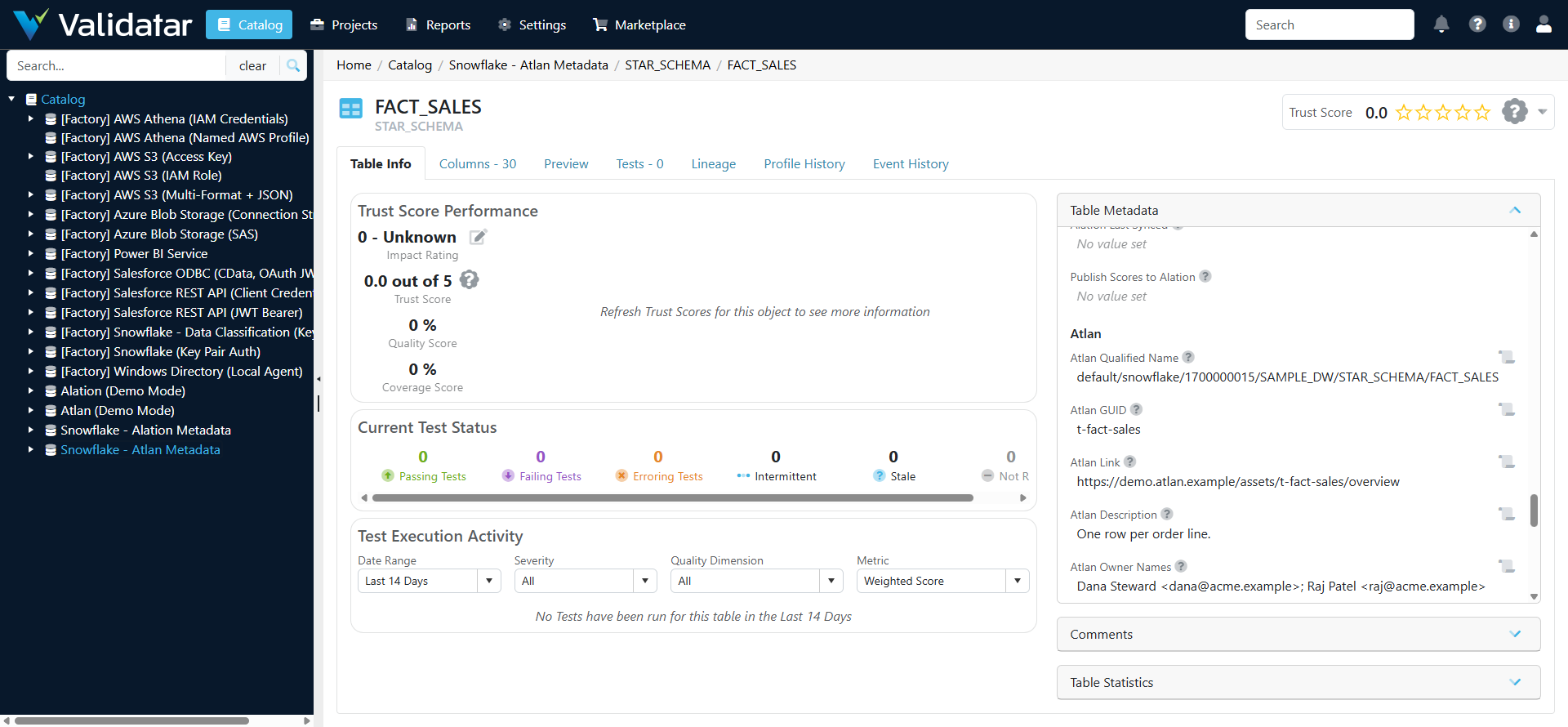
With this context in Validatar, teams can prioritise testing by domain or certificate, route failures to the right owner, and see which downstream objects a failed test affects.
How it works
The integration is packaged as an Atlan data source template. It holds the credentials for both the Atlan and Validatar APIs and the code every job shares. Each job runs through a standard Validatar feature, on a connection built from the template with the same Atlan settings:
| Job | Runs in Validatar as | Typical schedule |
|---|---|---|
| Bring in Atlan owners, tags, terms, certificates and domains | A Custom Metadata source on each warehouse data source, running the metadata script | Daily |
| Bring in Atlan lineage | A Lineage Ingestion source running the lineage script | Weekly |
| Publish scores and selected test results | A Python test, using the template's publish macro, placed last in the scheduled test job | After every test run |
| Publish a critical test's result immediately | A test action on that test, using the template's second macro | Each time the test runs |
| Catalog the Atlan tenant and check its health | Metadata ingestion on the Atlan data source, then the Atlan Instance Health Checks tests | Daily |
Because the publish step is itself a Validatar test, every publish has a pass or fail history and can alert like any other test.
Checking the health of the Atlan tenant
The Atlan data source's own catalog is the Atlan tenant: each Atlan object type (connections, glossaries and terms, tags, custom metadata, data domains and products, personas, purposes, groups and recent workflow runs) is a schema, and each object is a table whose columns hold its properties. The Atlan Instance Health Checks pack tests that catalog and the Atlan API behind it. It covers API tokens about to expire, crawler runs that failed, connections that have not been crawled recently, tables without owners or descriptions, owners who are no longer active users, deprecated assets that other assets still read, duplicate glossary terms and tags, empty data domains, expired announcements, and whether Validatar's own publishing into Atlan is current.
Trying it without Atlan
Turn on Demo Mode on the Atlan data source and every Atlan call is answered by a built-in sample tenant, a fictional company with four connections and a few deliberate problems. The object catalog, the health checks, the scripts and the publish step all run against it, nothing is sent to Atlan, and pyatlan does not need to be installed.
Matching the two catalogs
Validatar and Atlan identify tables differently, so each job pairs a Validatar data source with an Atlan connection and matches schemas, tables and columns by name within the pair. An Atlan connection is named by its qualified name, such as default/snowflake/1657025257. The metadata and lineage scripts name their Atlan connection at the top of the script; publishing uses a connection map on the Atlan data source. The Atlan data source's own catalog lists every connection with its qualified name, so the pairs are built from what Atlan reports. Once the metadata script has run, each table's Atlan qualified name is stored in Validatar and publishing uses it directly. Objects found on one side and not the other are counted and reported, never silently dropped.
Requirements
Atlan
- An integration identity: an OAuth client (Admin > API access > OAuth clients) or an API token (Admin > API access). OAuth clients are the default; API tokens are also supported.
- Personas on that identity covering the connections in scope. Without personas, a token can only see connections it created.
- Permission through those personas to read assets and lineage and to update custom metadata values. Updating assets is also needed for announcements and for the external data quality preview.
- An Atlan admin to create the Validatar custom metadata set once, and for the two health checks that list API tokens and users.
- Room in Atlan's API limit. Atlan allows 400 API calls a minute for the whole tenant and blocks programmatic calls for a minute when it is exceeded. The integration holds itself to 300 a minute by default, and the limit can be lowered on the data source.
Validatar
- Atlan's Python SDK, pyatlan 11.4, installed in the Python that runs Validatar scripts: under Settings > Configuration for the Validatar server or cloud runtime, or through the Data Agent's Python module install when scripts run on an agent. Demo Mode needs no install.
- A Validatar API token for the integration, used to publish and by the lineage script
- Govern Edition, to define the integration's custom fields
- The Data Lineage feature, to bring in Atlan lineage
- The Standard Test Actions feature, to publish critical test results the moment they run
Both platforms communicate over HTTPS. Atlan itself needs no Data Agent; the scripts run wherever the instance runs Python.
Rollout
Most teams adopt the integration in stages. Each stage is useful by itself.
- Prepare. Agree the decisions below, create credentials on both sides, map data sources, and create the Validatar custom metadata set in Atlan.
- Publish scores. Add the publish step to the daily test job with Trust Score scope, run it in Dry Run, then turn Dry Run off. Tested tables in Atlan now show Validatar scores.
- Publish dimensions and tests. Import the project custom fields, widen the scope, opt in the tests that matter to catalog users, and add test actions to critical tests.
- Bring in Atlan metadata. Import the Atlan custom fields, then add the metadata script to each warehouse data source.
- Bring in lineage. Start with table-level lineage, then add columns where needed.
Decisions to make before setup
| Decision | Common starting point |
|---|---|
| Which data sources are in scope | The two or three warehouses Validatar tests most |
| How the integration signs in to Atlan | An OAuth client with a persona per set of connections |
| Publish scope | Trust Score for the first week, then Trust + Dimensions + Tests |
| Which tests are published | Only tests opted in by their owners |
| Badge thresholds | Green at 90, yellow at 75 |
| Which dimensions get a property in Atlan | All 13, or only the dimensions your tests use |
| Whether to post announcements in Atlan | Off until the data stewards agree |
| Whether to try the external data quality preview | Off; custom metadata only |
| Which Atlan custom metadata to bring into Validatar | Two to five properties that affect test priority, such as data owner and criticality |
| Lineage depth | Table level |
What has been tested
The integration has run inside Validatar against the built-in sample tenant. That covered importing the template, cataloging the sample tenant, all 15 health checks (27 results with child tests, each as designed), the metadata script filling the Atlan fields on a Snowflake data source, the lineage script loading table lineage, importing all four items from the marketplace, and both publishing macros with Dry Run off: the publish test sent scores, dimension scores and failing tests for the tested tables, and a test action republished a table the moment its test ran. The Atlan calls, including the custom metadata write and the setup script, have been exercised through pyatlan against a simulated Atlan server.
Related
- Atlan Data Source Template
- Atlan Custom Metadata for Validatar
- Atlan Instance Health Checks
- Atlan Metadata and Lineage Scripts
- Atlan Catalog Custom Fields
- Atlan Project Custom Fields
- What Is a Data Source Template?
- What are Test Actions
- How Trust Scores Are Calculated
- Quality Dimensions
- Impact Ratings
- Configuring Custom Fields
Note: This article describes the design of the Validatar and Atlan integration. It has been built from Atlan's documentation and its official Python SDK and tested in Validatar against a built-in sample Atlan tenant. It has not yet been validated against a live Atlan tenant. Setup details may change after that validation. To discuss using it, contact your Validatar account team.