Overview
Metadata ingestion is the process of discovering what's inside a data source — the schemas, tables, views, and columns that make up its structure. For SQL-based data source templates, this discovery is powered by SQL scripts that query the platform's system catalogs (like INFORMATION_SCHEMA views or platform-specific metadata tables). The template defines default scripts for each level of metadata, and individual data sources inherit those defaults while retaining the option to customize.
This article covers metadata ingestion for Database category templates (SQL Server, PostgreSQL, Snowflake, Redshift, BigQuery, etc.). For Python-based templates, see Metadata Ingestion Scripts — Python Templates.
The Metadata Ingestion Tab
Open any SQL-based template and navigate to the Metadata Ingestion tab. You'll see sub-tabs for each ingestion level:
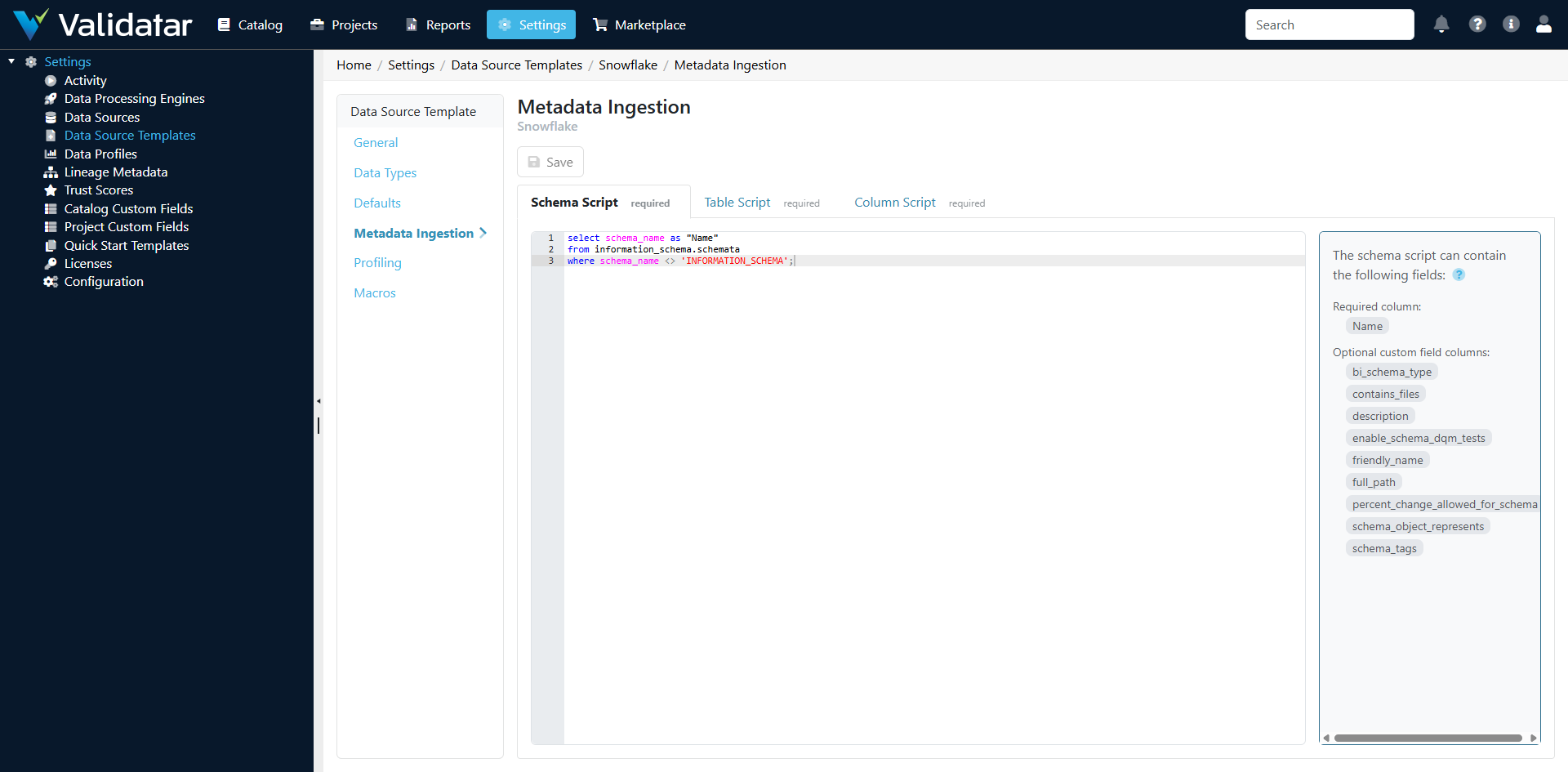
Three Ingestion Levels
SQL templates organize metadata ingestion into three levels, each with its own script. The scripts execute in order during an ingestion run: schemas first, then tables, then columns.
Schema Level
The schema-level script discovers all schemas (or databases, depending on the platform) in the data source. It returns a result set where each row represents one schema.
Expected columns in the result set:
| Column | Required | Description |
|---|---|---|
schema_name |
Yes | The name of the schema |
Example — SQL Server:
SELECT
    s.name AS schema_name
FROM sys.schemas s
WHERE s.schema_id NOT IN (3, 4)  -- Exclude system schemas
  AND s.name NOT IN ('guest', 'INFORMATION_SCHEMA', 'sys')
ORDER BY s.name;
Example — Snowflake:
SELECT
    SCHEMA_NAME AS schema_name
FROM INFORMATION_SCHEMA.SCHEMATA
WHERE SCHEMA_NAME NOT IN ('INFORMATION_SCHEMA')
ORDER BY SCHEMA_NAME;
Example — PostgreSQL:
SELECT
    schema_name
FROM information_schema.schemata
WHERE schema_name NOT LIKE 'pg_%'
  AND schema_name != 'information_schema'
ORDER BY schema_name;
Table Level
The table-level script discovers all tables and views within the schemas found by the schema-level script. Each row in the result set represents one table or view.
Expected columns in the result set:
| Column | Required | Description |
|---|---|---|
schema_name |
Yes | The schema this table belongs to |
table_name |
Yes | The name of the table or view |
table_type |
Yes | The type: TABLE, VIEW, or platform-specific variants |
Example — SQL Server:
SELECT
    s.name AS schema_name,
    t.name AS table_name,
    CASE WHEN t.type = 'U' THEN 'TABLE'
         WHEN t.type = 'V' THEN 'VIEW'
         ELSE t.type
    END AS table_type
FROM sys.objects t
INNER JOIN sys.schemas s ON t.schema_id = s.schema_id
WHERE t.type IN ('U', 'V')
  AND s.name NOT IN ('guest', 'INFORMATION_SCHEMA', 'sys')
ORDER BY s.name, t.name;
Example — Snowflake:
SELECT
    TABLE_SCHEMA AS schema_name,
    TABLE_NAME AS table_name,
    TABLE_TYPE AS table_type
FROM INFORMATION_SCHEMA.TABLES
WHERE TABLE_SCHEMA NOT IN ('INFORMATION_SCHEMA')
ORDER BY TABLE_SCHEMA, TABLE_NAME;
Column Level
The column-level script discovers all columns for the tables found by the table-level script. This is typically the most detailed script, returning column names, data types, nullability, and ordinal position.
Expected columns in the result set:
| Column | Required | Description |
|---|---|---|
schema_name |
Yes | The schema |
table_name |
Yes | The table |
column_name |
Yes | The column name |
data_type |
Yes | The data type (must match a mapping in the Data Types tab) |
ordinal_position |
No | Column order within the table |
is_nullable |
No | Whether the column allows nulls (YES/NO) |
character_maximum_length |
No | Max length for string columns |
numeric_precision |
No | Precision for numeric columns |
numeric_scale |
No | Scale for numeric columns |
Example — SQL Server:
SELECT
    s.name AS schema_name,
    o.name AS table_name,
    c.name AS column_name,
    t.name AS data_type,
    c.column_id AS ordinal_position,
    CASE WHEN c.is_nullable = 1 THEN 'YES' ELSE 'NO' END AS is_nullable,
    c.max_length AS character_maximum_length,
    c.precision AS numeric_precision,
    c.scale AS numeric_scale
FROM sys.columns c
INNER JOIN sys.objects o ON c.object_id = o.object_id
INNER JOIN sys.schemas s ON o.schema_id = s.schema_id
INNER JOIN sys.types t ON c.user_type_id = t.user_type_id
WHERE o.type IN ('U', 'V')
  AND s.name NOT IN ('guest', 'INFORMATION_SCHEMA', 'sys')
ORDER BY s.name, o.name, c.column_id;
How Defaults and Overrides Work
The scripts defined on the template are defaults. They provide a starting point that works for most data sources on the platform. The inheritance model works like this:
- Template defines default scripts for schema, table, and column levels
- When a data source is created with a connection that uses this template, it inherits those default scripts
- On the data source's Schema Metadata page, an administrator can view the active scripts and optionally override any level with custom SQL
- Overrides are stored on the data source, not on the template — the template's defaults remain unchanged
This means you can have a single Snowflake template that works for most databases, but customize the schema-level script for a specific data source that uses a non-standard schema naming convention.
Tip: To see whether a data source is using the template default or a custom override, navigate to the data source's Schema Metadata page and click Configure Ingestion SQL. If the script matches the template's default, the data source is using the inherited version.
Ingestion Execution Flow
When a user triggers metadata ingestion (manually via Refresh Now or via a schedule), here's what happens:
- Schema script executes against the metadata connection — returns the list of schemas
- Table script executes — returns all tables and views across discovered schemas
- Column script executes — returns all columns with data types and attributes
- Validatar processes the results, comparing them against existing metadata:
- New schemas, tables, and columns are added to the catalog
- Removed objects are marked as deleted (not physically removed, preserving history)
- Changed attributes (data types, nullability) are updated
- Statistics are recorded — schema count, table count, column count, duration
The metadata connection may be the same as the primary connection or a separate connection with read-only access to system catalogs. This is configured on the data source's Schema Metadata page.
Tips for Writing Custom Ingestion Scripts
Match the Expected Column Names
Validatar expects specific column names in the result set. If your script returns SchemaName instead of schema_name, the results won't be processed correctly. Always alias your columns to match the expected names.
Filter System Objects
Most platforms have system schemas, tables, and views that aren't relevant for data quality testing. Filter these out in your scripts to keep the catalog clean:
- SQL Server: exclude
sys,INFORMATION_SCHEMA,guestschemas - Snowflake: exclude
INFORMATION_SCHEMAschema - PostgreSQL: exclude
pg_*schemas andinformation_schema
Consider Performance
Column-level ingestion can be slow on large databases with thousands of tables. Consider:
- Using system catalog views that are optimized for metadata queries (e.g.,
sys.columnsin SQL Server is faster thanINFORMATION_SCHEMA.COLUMNSfor large databases) - Adding schema filters if you only need metadata for specific schemas
- Running ingestion during off-peak hours for production databases
Data Type Names Must Match
The data_type column returned by the column-level script must exactly match the engine type names defined on the template's Data Types tab. If the ingestion script returns character varying but the Data Types tab only has varchar, those columns won't be classified correctly.
Test with a Single Data Source First
When modifying a template's ingestion scripts, test the changes on a single data source before rolling them out. Create a test data source, override the ingestion scripts with your new versions, run ingestion, and verify the results in the catalog. Once confirmed, update the template defaults.
How This Fits Into the Bigger Picture
Metadata ingestion is the first operational step after a template is configured. The metadata it discovers populates Validatar's data catalog, which in turn drives:
- Profiling — profile sets need to know which tables and columns exist (see Profiling Configuration — SQL Templates)
- Test recommendations — Validatar suggests tests based on metadata structure and data types
- Template test materialization — template tests use metadata to generate child tests for matching structures
- Macros — macro parameters like Schema, Table, and Column dropdowns are populated from ingested metadata (see Macros)
For the end-to-end view, see Data Source Templates: The Complete Picture.