Overview
The Collibra data source template connects Validatar to Collibra in both directions from a single data source. That data source holds the credentials for both the Collibra and the Validatar APIs, and everything in the Collibra integration runs on its connection:
- Publishing to Collibra. Two macros publish Validatar's results as Data Quality Rule assets in a Validatar domain in Collibra. Collibra rolls the rules' Passing Fractions up into the External Data Quality section of the Quality tab on each column, table, schema and database.
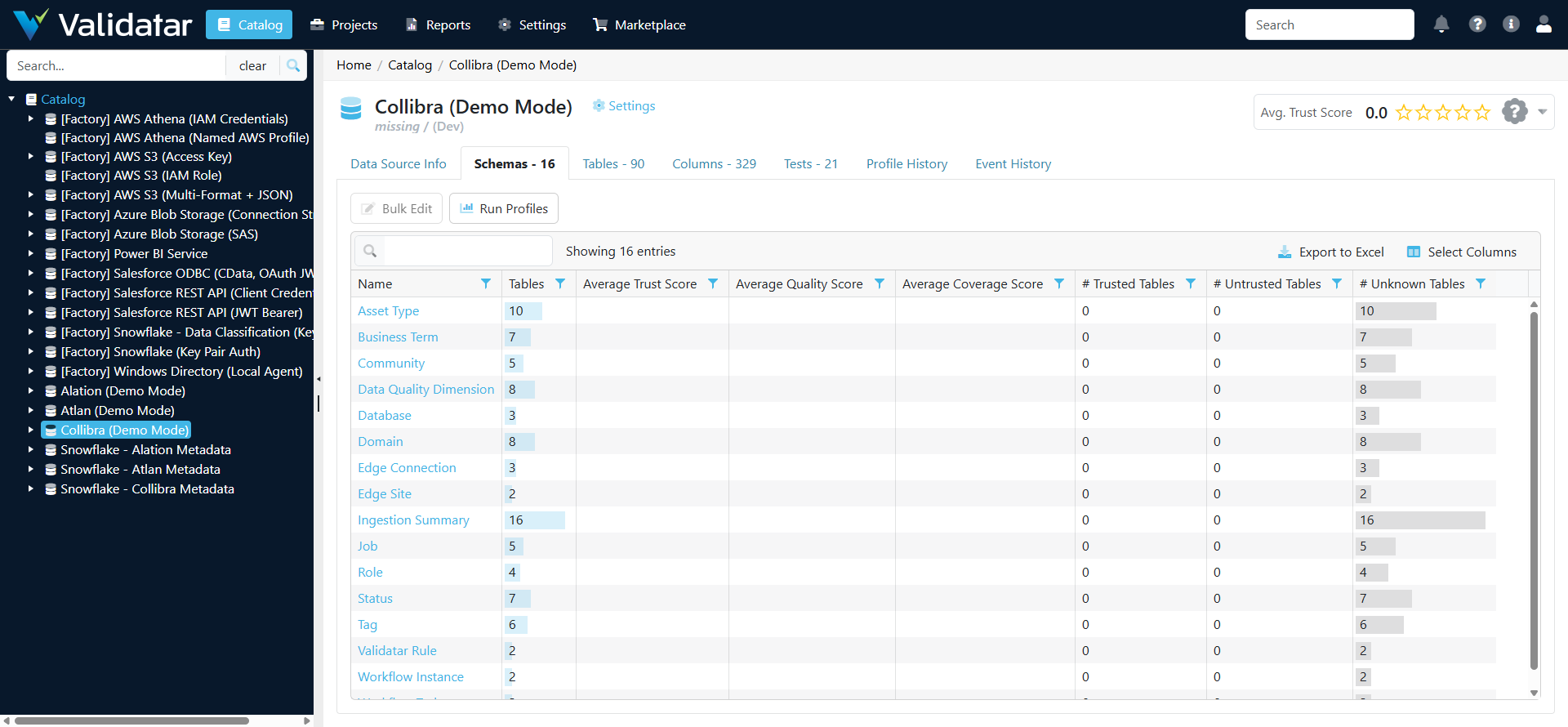
- Cataloging the Collibra instance. Ingesting the data source's metadata turns Collibra's own objects (communities, domains, databases, asset types, business terms, quality dimensions, Validatar's rules, statuses, tags, roles, Edge sites and connections, recent jobs, workflow instances and tasks) into Validatar tables, which the Collibra Instance Health Checks pack tests.
- Pulling from Collibra. The Collibra Metadata and Lineage Scripts run as Custom Metadata and Lineage Ingestion sources on connections built from this template, with the same Collibra settings. What is specific to each warehouse sits at the top of each script. The metadata script fills the Collibra Catalog Custom Fields.
Marketplace: Collibra - Data Source Template
How It Works
- One template, several hosts. The template's pre-execution script holds the Collibra client, the Validatar client and the code the metadata and lineage scripts share. It runs before every script on a connection built from the template: the data source's own metadata ingestion, the two macros, tests on the data source, and the Custom Metadata and Lineage Ingestion sources that use the template.
- Nothing to install. The Collibra client uses the Python standard library only. It reads through Collibra's Core REST API and its Knowledge Graph GraphQL API, and writes only through Collibra's Import API, whose jobs it waits for and checks. The paths and request shapes come from Collibra's published OpenAPI specifications.
- Collibra objects become tables. Metadata ingestion catalogs the Collibra instance itself. Each object type is a schema, each object a table named
<name> [<first 8 characters of its id>], and each of the object's properties a column whose comment holds the current value. Only the Standard Fields every Validatar instance ships are written (friendly name, description, tags), so the object catalog needs no custom field setup. - Nothing is written to Collibra unless you ask. Ingestion and the health checks only read. Publishing writes Data Quality Rules in the Validatar Data Quality domain, their relations to the columns and tables they govern and to quality dimensions, and, if you turn them on, score attributes on Table assets. It never changes your own assets' attributes, statuses or responsibilities. Dry Run is on by default.
- Demo mode. With Demo Mode on, every Collibra call is answered from a built-in sample instance: a fictional company with three databases registered through Edge (Snowflake SAMPLE_DW, Snowflake PROD and PostgreSQL CRM) whose metadata is healthy in most places and has a few deliberate problems. Use it to try the template, the health checks and the scripts before Collibra credentials exist. Nothing is sent to Collibra while it is on.
Authentication
Collibra supports two sign-in methods, chosen with Collibra Auth Method:
| Method | Where the credential comes from | How it is used |
|---|---|---|
| OAuth Client (default) | A Collibra admin registers an Integration OAuth application under Settings > OAuth Applications. Copy the client ID and the client secret, which is shown once. Give the application's system user the roles below | Exchanged for a five-minute token, which the template reuses between runs |
| Basic | A Collibra user name and password, for self-hosted or older instances | Sent with every call. Uses no tokens |
Token reuse. Collibra gives each OAuth application a small pool of tokens that refills slowly, and returns HTTP 429 when a client asks for tokens faster than that. The template keeps its token in memory between runs and reuses it until shortly before it expires, which works best when the scripts run on a Data Agent, whose Python keeps running between scripts. On HTTP 429 the template waits as long as Collibra asks, or backs off, and tries again; on HTTP 401 it fetches a new token once. Use one OAuth application for Validatar alone.
What the Collibra identity needs.
- read access to the physical data dictionary domains of the databases in scope, for ingestion, the health checks, the metadata and lineage scripts, and matching tables when publishing
- a role that can create and edit assets in the Validatar Data Quality domain, and add relations from those assets to columns and tables, for publishing
- a role that can list users, and one that can see every user's jobs and workflow tasks, for three of the health checks
An object type the identity may not read is reported as not permitted rather than passing. Collibra Setup for Validatar lists the permissions in full.
Validatar. An API token sent as the x-val-api-token header, with the Catalog, Authoring, Execution and DataSteward scopes. Publishing and the lineage script need it. The object catalog, the health checks and the metadata script do not, although with a token the Database schema of the object catalog also suggests which Validatar data source matches each Collibra database.
Connection Parameters
| Parameter | Required | Default | Purpose |
|---|---|---|---|
| Collibra Base URL | Yes | Your Collibra URL, for example https://acme.collibra.com, with no trailing slash |
|
| Collibra Auth Method | Yes | OAuth Client | OAuth Client or Basic |
| Collibra OAuth Client ID | OAuth Client | The Integration OAuth application's client ID | |
| Collibra OAuth Client Secret | OAuth Client | Its client secret | |
| Collibra Username | Basic | A Collibra user name | |
| Collibra Password | Basic | Its password | |
| Demo Mode | Yes | false | Answer every Collibra call from the built-in sample instance |
| Validatar Base URL | For publishing and lineage | Your Validatar URL, for example https://acme.cloud.validatar.com |
|
| Validatar API Token | For publishing and lineage | A Validatar API token with the Catalog, Authoring, Execution and DataSteward scopes | |
| Collibra Connection Map | For publishing | Which Validatar data source is which Collibra database, as <Validatar data source id>=<database full name> separated by ;, for example 27=Snowflake-Connection>SAMPLE_DW; 30=PostgreSQL-CRM>crm. The metadata and lineage scripts carry their own settings |
|
| Validatar Domain ID | No | the domain named Validatar Data Quality | The Collibra domain that holds Validatar's rules, created by collibra_setup.py |
| Publish Scope | Yes | Trust + Dimensions + Tests | Trust Score (one rule per table); Trust + Dimensions (one rule per table and dimension); Trust + Dimensions + Tests (one rule per test) |
| Publish Tests | Yes | All tests | All tests, or Opted-in tests |
| Publish Dimensions | No | every dimension with tests | Trust + Dimensions only: limit the dimensions published, for example Completeness,Validity,Timeliness |
| Dimension Map | No | Validatar dimensions whose Collibra Data Quality Dimension has another name, as <Validatar>=<Collibra> separated by ;, for example Validity=Conformity; Standards=Conformity |
|
| Passing Fraction Scale | Yes | Percent (0-100) | How a rule's Passing Fraction is written: 98.5, or 0.985 with Fraction (0-1) |
| Retired Rules | Yes | Delete | What happens to a Validatar rule that is no longer published: Delete, or Mark Obsolete |
| Score Attributes | Yes | false | Also write Validatar's trust, quality and coverage scores, last run and a link as attributes on each matched Table asset |
| Score Good At | Yes | 90 | A score at or above this reports GREEN in the publish test's report |
| Score Warning At | Yes | 75 | A score at or above this and below Good reports YELLOW; below it, RED |
| Collibra Object Types | No | every type except User | Object types to catalog at ingestion, comma-separated |
| Max Objects Per Type | No | 5000 | Upper limit on objects cataloged per type |
| Dry Run | Yes | true | Read and report, but write nothing to Collibra or to test custom fields |
Finding database full names
Collibra names each database registered through Edge <Edge connection>><database>, for example Snowflake-Connection>SAMPLE_DW, and every schema, table and column under it starts with that name. After the first metadata ingestion, the Database schema of the Collibra data source lists every database the integration can see, with its full name, its Edge connection, its domain and the Validatar data source it is mapped to in Collibra Connection Map. An unmapped database shows a suggested Validatar data source when one has the same database name. Build the map from those rows.
Capabilities
Metadata Ingestion: the Collibra Object Catalog
| Schema | What each table is |
|---|---|
| Community | A community, with its parent |
| Domain | A domain, with its type and community |
| Database | A database registered through Edge, with its full name, Edge connection, domain, status, mapped Validatar data source and suggested match, for example SAMPLE_DW [98512984] |
| Asset Type | An asset type in the operating model, with its public id and parent |
| Business Term | A business term, with its domain, community, status and whether it has a definition |
| Data Quality Dimension | A dimension that classifies quality rules, and the Validatar dimensions published under it |
| Validatar Rule | A Data Quality Rule Validatar has published, with its status and when it was last published |
| Status | An asset status |
| Tag | A tag and how many assets carry it |
| Role | A resource role, such as Owner or Business Steward |
| Edge Site | An Edge site, with its status and current and pending versions |
| Edge Connection | An Edge connection, with its site, host and database |
| Job | One of the 100 most recent jobs, such as schema synchronizations, imports and classifications, with its result |
| Workflow Instance | A workflow instance in error or still running, with its error message |
| Workflow Task | An open workflow task, with its owner and due date |
| User | A user, and whether the account is enabled. Opt-in through Collibra Object Types, because it holds names and emails |
| Ingestion Summary | One table per object type: Loaded, Loaded (truncated) when capped by Max Objects Per Type, Not selected, Skipped: not permitted, Not available on this instance, or Failed |
Macros
| Macro | Type | Use |
|---|---|---|
| Publish to Collibra | Test data set | The data set of a test on the Collibra data source, placed last in a scheduled test job. Publishes the rules for every mapped data source and returns one row per rule. Its optional parameter Validatar Data Source IDs limits it to some mapped data sources, as a comma-separated list such as 27,30 |
| Push Test Result to Collibra | Standard test action | A Run a Macro step in a test action on a standard test. Publishes that test's rule as soon as the test runs. Set its parameters to {{test_url}}, {{test_name}}, {{result}} and {{execution_url}} |
What the publish test returns. One row per rule, plus a row for each table that produced none, with these columns:
| Column | Holds |
|---|---|
outcome |
published, dry run, skipped (the table's Publish Scores to Collibra is No), unmatched (no Collibra table or view with that schema and name in the mapped database), no scores (matched, but no Validatar test has run against the table yet), not scored (the test's latest run errored), failed (Collibra's import job reported an error) or error (Validatar could not be read for the table) |
validatar_data_source_id, schema, table |
The Validatar table |
collibra_full_name |
The Collibra table or view it was matched to |
granularity |
table, dimension or test, from Publish Scope |
rule |
The rule's display name in Collibra |
passing_fraction, band |
The Passing Fraction written, in the chosen scale, and its GREEN, YELLOW or RED band |
governs |
The Collibra asset the rule governs |
dimension |
The quality dimension that classifies the rule |
detail |
What was left out, or why the row has no rule |
The test also prints a summary: how many tables were matched, unmatched, skipped and without scores, the import jobs it ran, and any rule attribute your operating model does not assign (rule_attributes_not_assigned). Because the publish step is a Validatar test, every publish has a pass or fail history and can alert like any other test. Leave Dry Run on until the rows show what you expect.
How the batch publish works. Each Validatar data source in the map is one Collibra Import API synchronization, sent as one job. Every rule carries an external id made of the Validatar instance and the test (or table, or table and dimension), so a rule is updated in place on every run. When the job completes, a rule that is no longer published is deleted, or marked Obsolete when Retired Rules is Mark Obsolete. Collibra warns that an incomplete synchronization can delete assets, so when any table of the data source could not be read, the run writes its rules without that final step and says so. With Dry Run off, the publish test also writes each test's Collibra Target Asset ID and Collibra Rule Asset ID back to the test.
How the test action works. A test action receives the test's URL, name, result and execution URL. The action reads the test's Collibra Target Asset ID field, which the publish test fills the first time it publishes with Dry Run off (or which you set by hand), then writes that one test's rule with its new Passing Fraction in a single import job. Collibra recomputes the averages itself. Until the field is filled the action reports that it skipped the test. It acts only when Publish Scope is Trust + Dimensions + Tests, only on tests the publish test would select, and only on results Passed, Failed and Error; an errored run is reported and not scored. Test actions fire on standard tests only, and only in projects where a Validatar admin has turned on the Standard Test Actions optional feature.
What a rule holds
| Part | Value |
|---|---|
| Passing Fraction | The quality score of the test, or of the table or dimension, as below |
| Loaded Rows, Rows Passing, Rows Breaking | The row counts of the test's latest run, when it counts rows |
| Description | The result, the last run date and a View in Validatar link |
| Relations | The column or table the rule governs, and its Data Quality Dimension |
| Status | Accepted |
Passing Fraction follows Validatar's own scoring:
| Publish Scope | Passing Fraction |
|---|---|
| Trust + Dimensions + Tests | The test's quality score under its Scoring Method: All or Nothing gives 1 or 0; Proportional gives passed rows over total rows; Proportional with Pass Override gives 1 when the test passed, otherwise passed over total; Custom Calculation gives 1 or 0 by result, because the formula is not available through Validatar's API, and the description says so |
| Trust + Dimensions | The average quality score of the table's tests in the dimension. The API does not expose severity weights, so the average is not weighted |
| Trust Score | Validatar's weighted quality score for the table: each test's quality score times its severity weight, over the sum of the weights |
A test whose latest run errored is not scored. A table with no test runs yet produces no rule. Scores are written on a 0 to 100 scale by default, or 0 to 1 with Passing Fraction Scale. Which scale Collibra expects has not yet been confirmed on a live instance; Collibra Setup for Validatar explains how to choose.
What a rule governs. At the per-test scope, a test linked to exactly one column in Validatar governs that column's asset, so it shows on the column and rolls up to the table through Collibra's built-in aggregation paths. Any other test governs the table, and so do the table and dimension rules. The Collibra Target Asset ID test field overrides the choice. Rules that govern tables need one extra aggregation path in Collibra, described in Collibra Setup for Validatar.
Choosing what to publish
- Publish Scope chooses the level of detail. Collibra averages every rule it finds on an asset, so one level is published at a time, and changing the scope replaces the old rules on the next run.
- Publish Tests. With All tests, the default, every test on a matched table is published unless its Publish to Collibra field is No. With Opted-in tests, only tests whose field is Yes are published.
- Test-level fields. Five project custom fields on the test, in a section named Collibra Publishing:
| Field | Reference key | Type | Purpose |
|---|---|---|---|
| Publish to Collibra | collibra_publish |
Dropdown: Yes, No | Opt the test in or out |
| Collibra Rule Name | collibra_rule_name |
Short text | The name Collibra shows for the test's rule, in place of its Validatar name |
| Collibra Dimension | collibra_dimension |
Short text | The Collibra Data Quality Dimension for this test's rule, in place of its Validatar dimension |
| Collibra Target Asset ID | collibra_target_asset_id |
Short text | The Collibra asset the rule governs. The publish test fills it; set a column's asset id to show the result on that column |
| Collibra Rule Asset ID | collibra_rule_asset_id |
Short text | The rule's asset id in Collibra, filled by the publish test |
The fields come as their own marketplace item, Collibra Project Custom Fields. Import it once before you publish tests. To create the fields by hand instead, use exactly these reference keys, as described in Configuring Custom Fields.
Table-level opt-out. Set a table's Publish Scores to Collibra field to No to keep it out of Collibra, for example a staging table that is tested but not meant for catalog users. The field is part of the Collibra Catalog Custom Fields set.
How tables are matched. Each entry of Collibra Connection Map pairs a Validatar data source with a Collibra database. Within a pair, a Validatar table is matched first by its Collibra Asset ID field, which the metadata script fills, and otherwise by schema and table name among the database's tables and views. Tables found on one side only are reported as unmatched.
Optional score attributes
With Score Attributes on, the publish test also writes Validatar Trust Score, Validatar Quality Score, Validatar Coverage Score, Validatar Last Run and Validatar Link on each matched Table asset. Trust is published on a 0 to 100 scale: Validatar's 0 to 5 stars times 20, so 4.5 stars is 90. These attributes go to your own assets, so they are written in a separate import that never removes anything. An admin creates the attribute types and assigns them to the Table asset type first, as described in Collibra Setup for Validatar.
Custom Fields
The object catalog needs none. Publishing reads two fields of the Collibra Catalog Custom Fields set on each table: Collibra Asset ID, which the metadata script fills, and Publish Scores to Collibra, the per-table opt-out. Tests are selected and placed through the Collibra Publishing test fields above.
Installation
- Open Marketplace in Validatar, find Collibra - Data Source Template and choose Get, then Import Directly. Validatar adds it under Settings > Data Source Templates. If a template named Collibra already exists, tick the option to overwrite it.
- Create a data source from the template. If your Python scripts run on a Data Agent, assign the agent group. To try it first, set Demo Mode to true and leave the credentials blank apart from Collibra Base URL, which can be any URL.
- Run Ingest Technical Metadata on the data source and open its catalog. Check the Ingestion Summary schema: every object type should say Loaded, or say why not.
- For real use, turn Demo Mode off, fill in the Collibra credentials and ingest again.
To install from a file instead, download the template from the marketplace listing and import it under Settings > Data Source Templates > Import.
Setting up publishing
- Prepare Collibra, as described in Collibra Setup for Validatar: the Validatar Data Quality domain, the dimension check and the aggregation path for table-level rules.
- Import the Collibra Catalog Custom Fields and the Collibra Project Custom Fields, and run the metadata script on each warehouse data source in scope.
- On the Collibra data source, fill in Validatar Base URL, Validatar API Token and Collibra Connection Map, and choose the scope, the Passing Fraction scale and, if your dimensions have other names, the Dimension Map.
- Create a test on the Collibra data source whose test data set is the Publish to Collibra macro. Fill Validatar Data Source IDs or leave it blank for every mapped data source. Set the result processing to row count and pass the test when at least one row comes back. Add the test as the last step of the scheduled test job.
- Run the job with Dry Run on and read the publish test's rows and summary. When they show what you expect, turn Dry Run off.
- For real-time results on critical tests, add a test action to those tests: trigger Test Ran, then a Run a Macro step on the Collibra data source for Push Test Result to Collibra, with its parameters set to
{{test_url}},{{test_name}},{{result}}and{{execution_url}}. Test actions need the Standard Test Actions optional feature.
Upgrading
Each Collibra data source, and the connection of each Custom Metadata and Lineage Ingestion source that uses the template, keeps its own copy of the template's pre-execution script. Importing a newer template version does not update those copies, and saving a data source or connection again keeps the copy it already has. After an upgrade, open each of these connections and make sure its Pre-Execution Script matches the one in Settings > Data Source Templates > Collibra, replacing it where it does not.
Troubleshooting
| Symptom | Cause | Fix |
|---|---|---|
| Ingestion stays at Running | The data source runs Python on a Data Agent and none is assigned or connected | Assign the data source to a Data Agent group whose agent is online |
| An object type shows "Skipped: not permitted" | The Collibra identity may not read it | Give it the role it needs. Users, jobs and tasks of other users need broader roles |
| An object type shows "Not available on this instance" | The feature or API is not on this instance | Nothing to fix |
| Every call returns 401 | The OAuth application was deleted or its secret regenerated, or the Basic password changed | Update the credentials |
| A call fails with 403 | The identity lacks a permission on a domain or an action | Give it the permission; see Collibra Setup for Validatar |
| HTTP 429, or runs slow down | The OAuth application's token pool, or Collibra's throttling, was reached | The template waits and retries. Use one OAuth application for Validatar alone, or Basic sign-in |
| A GraphQL error naming a field or filter | Collibra is older than 2024.02 | Upgrade Collibra; the integration needs the Knowledge Graph API |
| "Collibra domain 'Validatar Data Quality' not found" | The domain was never created, or has another name | Run collibra_setup.py --apply, or set Validatar Domain ID |
Publish rows show unmatched |
Collibra has no table or view with that schema and name under the mapped database | Check the map entry; run the metadata script so tables carry Collibra Asset ID |
Publish rows show failed |
Collibra's import job rejected a rule | Read the row's detail and the job's errors in Collibra; a missing relation type or permission is the usual cause |
| Rules are published but no asset shows a score | No "governs" relation was found, or the aggregation path for tables is missing | Check the setup script's output; add Table is governed by Data Quality Rule |
| Scores look 100 times too large or too small | Passing Fraction Scale differs from what your Collibra instance expects | Change the scale |
| The test action reports "collibra_target_asset_id is empty" | The publish test has not run with Dry Run off since the test was published | Run the publish test once, or set the field on the test |
| The test action reports that the scope publishes test-level rules only | Publish Scope is Trust Score or Trust + Dimensions | Use Trust + Dimensions + Tests, or remove the test action |
Related Articles
- Collibra Integration
- Collibra Setup for Validatar
- Collibra Instance Health Checks
- Collibra Metadata and Lineage Scripts
- Collibra Catalog Custom Fields
- Collibra Project Custom Fields
- Data Source Template Macros
- What Is a Data Source Template?
- Python Script Data Source Template
Note: This template is built from Collibra's documentation and published OpenAPI specifications. It has been tested offline and against its built-in sample instance (demo mode), with every REST call it makes checked against Collibra's specifications and the publish step run through its real HTTP client against a local server that answers like the sample instance. Inside Validatar, the template imported from the Validatar marketplace and both macros ran with Dry Run off: the publish test published rules for a set of tests and recorded each rule and its target on the test (a Proportional test that failed 324 of 3,240 rows published 90), and the test action pushed a single test's result. It has not yet been run against a live Collibra instance, so parameters and behaviour may change after that validation.